
+Free Beginner-Friendly Kit Included (Sheets + Printable PDFs)
The Ultimate Habit Tracker Spreadsheet isn’t just a checkbox system — it’s a complete structure for tracking, reflecting, and staying consistent. If you’re comparing options online or wondering what really works, here’s what a truly effective tracker should do — and why most don’t.
If you haven’t seen it yet, this article is a hands-on walkthrough that expands on The Ultimate Guide to Google Sheets Habit Trackers. That’s the place to start if you want to understand how to choose the right tracker in the first place — and why most templates fall short.
By GoToBetter | Designed for clarity, not complexity
Most habit trackers — especially spreadsheets — look useful at first. Rows, checkboxes, dates. Maybe even a graph. But once you actually start using them, something’s missing.
They tell you what you did. But they don’t help you keep going.
They don’t adjust to your schedule. They don’t balance your habits across the week. They don’t show you when you’re slipping — or why. And they definitely don’t motivate you when the excitement wears off.
If you’re serious about habit change, your tracker has to do more than log behavior. It has to support it.
So what should a truly ultimate habit tracker spreadsheet look like?
Not just technically — but emotionally, practically, day by day.
That’s what we’ll walk through in this article.
We’ll show you the features that make a real difference: motivation systems, weekly reviews, habit load balancing, printable planning, and more — all built into one tracker that works across devices, moods, and real life.
But first — if you’re just starting out and want something simpler to get going today, we’ve made a free version for you.
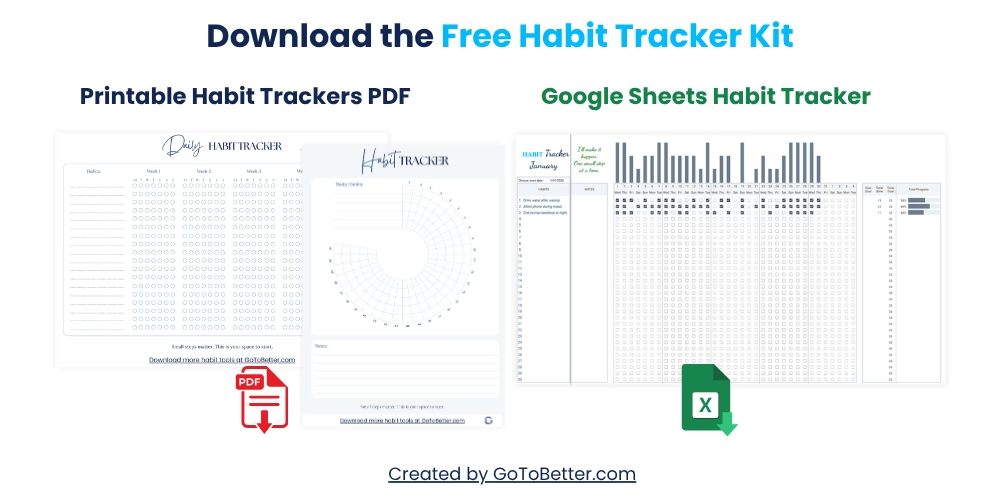
Start with the Free Google Sheets Habit Tracker Kit — designed for beginners and easy to use from day one.
Here’s what’s inside:
- Google Sheets habit tracker — track up to 30 habits with one-click updates and visual bars. Works on desktop or phone. No setup needed.
- Printable daily grid — for paper lovers, journaling, or fridge use. Minimal and clean.
- Printable 30-day circle — a visual way to see your consistency at a glance. Great for short habit sprints or motivation boosts.
Whether you’re a spreadsheet person or a pen-and-paper thinker, this free starter kit gives you both options. Perfect if you’re starting small — or starting over.
Write your email and get your Free Kit here↓
What Makes the Ultimate Habit Tracker Spreadsheet Different?
If you’ve tried habit trackers before — apps, spreadsheets, journals — you probably know the pattern. Neat at first. Then slowly abandoned. Not because you failed, but because the system didn’t help you adapt.
This is exactly why we created The Ultimate Google Sheets Habit Tracker Spreadsheet. There was nothing out there that combined clarity, motivation, reflection, and real-life flexibility in one place. So we built it.
It’s not just a spreadsheet. It’s a full habit-change system — one that guides, supports, and reflects your actual behavior without friction or clutter.
This tracker doesn’t just record what you did. It changes how you feel about it. It’s calm. Visual. Satisfying. And it works even when motivation dips — because motivation is built in.
GoToBetter says it like this: “Most spreadsheets track habits. This one helps you grow them.”
Here’s what sets it apart:
- Behavior-first layout — daily, weekly, monthly views in one flow
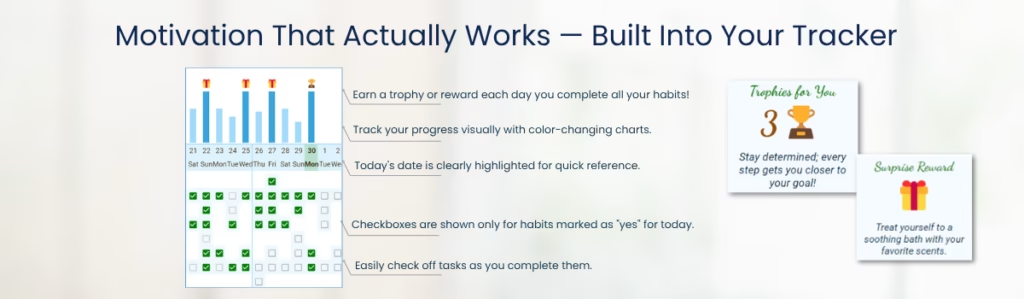
- Motivation triggers — built-in trophy system, rewards, and weekly wins
- Zero setup — copy, choose habits, and go
- Balance by day + category — see when your habit load gets too heavy
- Reflection spaces — small, calm prompts to self-check without pressure
See It in Action: How the Ultimate Habit Tracker Spreadsheet Works Day by Day
Each morning, you open your sheet and land directly on the daily habit table. Every habit you’ve selected shows up with a checkbox. Click it — and the tracker does the rest. Progress bars fill. Numbers update. Behind the scenes, your weekly and monthly graphs start shifting.
No formulas to touch. No calendar to rearrange. The system is already there — quietly moving with you.
You might notice that some habits show up only on certain days. That’s the tracker adjusting your habit load across the week. No more overwhelming Mondays or forgotten Thursdays. It spaces your intentions sensibly.
Each day also includes:
- One-click checkboxes with conditional formatting
- Daily load indicator — how many habits are active today
- Visual progress bar per habit
- Optional notes for anything worth remembering
Why the Best Trackers Let You Choose Habit Days
One of the biggest silent reasons habit trackers fail? They assume every habit should happen every day.
But not all habits are daily. Some — like strength training or deep cleaning — need rest in between. Others feel meaningful once or twice a week, not seven. If your tracker pushes every habit onto every day, it stops being supportive. It becomes a source of quiet pressure.
That’s why researchers recommend frequency-based design in habit systems: trackers that adapt to the rhythm of your real life — not theoretical ideals.
And yet, most templates still default to “daily” — without letting you pick.
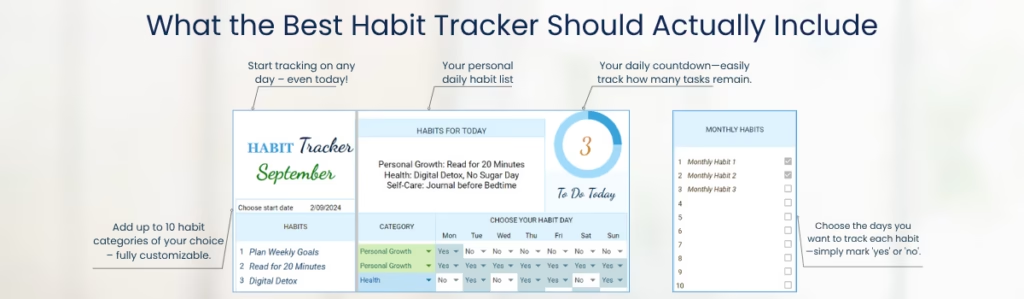
In the Ultimate Habit Tracker, every habit can be scheduled on specific days. Want to meditate Monday to Thursday, but skip Friday? Set it once — and the sheet will only show it when it’s actually relevant. The same logic helps you avoid overloaded Mondays or burnout Sundays.
You stay focused. Your habit load stays realistic. And best of all — no more guilt from seeing a habit you had no intention of doing today.
GoToBetter says it like this: “If your tracker makes you feel behind before you start — it’s not a tracker. It’s a guilt machine.”
What Research Says About Motivation (And How the Habit Tracker Uses It)
Most habit trackers skip the question: What actually keeps you coming back?
Motivation, right? But motivation fades fast. And here’s the key insight from behavioral science: people aren’t driven just by goals — they’re driven by surprise rewards.
Studies on dopamine (including foundational work by Schultz, 1997) show that the brain reacts more strongly to unexpected rewards than expected ones. It’s not the reward itself that matters most — it’s the surprise that triggers real engagement and repeat behavior.
In simple terms: a “good job” popup doesn’t hit the same if you expect it every time. But if it shows up unexpectedly — when your brain isn’t braced for it — it sparks energy.
That’s why the best habit trackers don’t just log behavior. They create moments of unexpected delight. Tiny emotional wins that nudge you forward without demanding more willpower.
So in the Ultimate Habit Tracker, that’s exactly what we built:
- Surprise trophies that unlock on hidden milestones
- Occasional reward prompts that appear — then vanish again
- Visual shifts (color changes, bar animations) triggered by real progress, not time
Some of these rewards are tied to habit streaks. Others? You won’t know they’re coming — until they arrive. The point is to make consistency emotionally rewarding — without gamifying your entire life.
You can even pair these with real-world treats. Many users like to use the reward popup as a cue: take yourself out for coffee, claim a guilt-free evening off, or order something you’ve wanted for weeks.
GoToBetter says it like this: “Rewards don’t need to be big. They need to feel earned — and arrive like a gift, not a transaction.”
And unlike apps that flood your screen with coins and confetti, this sheet stays quiet. Subtle gold highlights. Calm animations. Space to feel good — without losing focus.
GoToBetter InsightTrigger rewards at unpredictable intervals. That’s what keeps the brain engaged — and helps habits feel worth repeating.
Why Overloading Kills Consistency (And How to Stay Balanced)
One of the fastest ways to quit a habit tracker? Let it pile everything onto one day.
It feels productive at first: 12 habits, all checked off. But within a week, the tracker becomes a source of stress — not structure. Because no matter how motivated you are, cognitive overload creates resistance.
In cognitive science, this is known as “decision fatigue.” The more options and obligations your brain holds at once, the more likely it is to shut down. That includes too many habits per day — even good ones.
The best habit systems solve this by load balancing. They space your habits across the week to reduce pressure and protect energy. You’re still doing the same things — but you’re no longer doing all of them today.
So here’s what happens in the Ultimate Habit Tracker Spreadsheet:
- Each habit has assigned days, so they only appear when relevant
- A daily load meter shows you how full your day really is
- When your load gets too high, the tracker highlights it — helping you pause or reschedule
Think of it like a meal plan. Too many nutrients in one sitting doesn’t help — it overwhelms digestion. Habits work the same way. Spread them. Space them. Let your life breathe.
And because the tracker also groups habits by category — like Health, Work, or Self-Care — you can spot imbalance fast. Are all your efforts going into productivity? Is self-care missing from your week? You’ll see it clearly.
| Habit | Day Spread | Category |
|---|---|---|
| Morning stretch | Mon / Wed / Fri | Health |
| Write 200 words | Daily | Creative |
| Digital detox | Sun only | Self-Care |
GoToBetter says it like this: “Habit systems should stretch you — not crush you.”
GoToBetter InsightSpread habits across the week and check your daily load. Overwhelm isn’t discipline — it’s a fast track to quitting.
Why Most Trackers Fail to Help You Learn (And How This One Does)
Tracking habits is just data — unless it tells you something.
Most trackers show you what you did. But they never ask what it meant. No space to reflect. No cues to notice patterns. Just a record of checkboxes — and an empty feeling if you stop checking them.
But reflection is what turns behavior into growth. Research in cognitive psychology (e.g. Schön, 1983; Moon, 2004) shows that small, structured self-reflection increases both insight and long-term success. It creates a feedback loop — awareness > adjustment > improvement — that makes habit change sustainable.
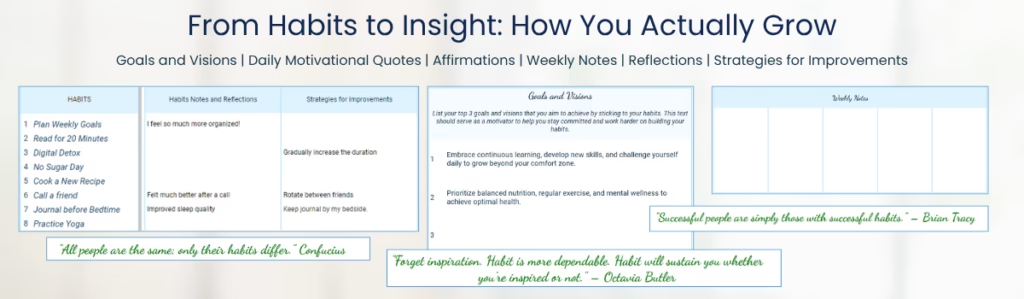
That’s why the Ultimate Habit Tracker includes a weekly reflection area. It’s not a journal. It’s a prompt space — short, light, and emotionally honest.
You’ll get:
- Weekly notes — What felt good? What felt forced?
- Streak awareness — Which habits fell off, and when?
- Category balance — Which areas of your life are under-supported?
- Kaizen space — A single sentence: What’s one thing to improve next week?
This isn’t about writing essays. It’s about noticing your own patterns. A moment to look, adjust, and move on — without shame.
One user told me they realized, after 3 quiet reflections, that they kept forcing a goal that didn’t matter anymore. Another said the weekly prompt became their “reset button” — something no app had ever offered.
GoToBetter says it like this: “Tracking tells you what. Reflection tells you why. Growth starts where those meet.”
GoToBetter InsightAdd one reflection prompt per week. It keeps the system human — and your progress meaningful.
Why Consistency Is Invisible (And How to Make It Visible Again)
Most people don’t quit because they’re failing. They quit because they can’t see that they’re succeeding.
Progress in habits is often subtle. You flossed 12 times this month — but forgot three. You showed up for 3 out of 5 workouts — but all you remember is the two you missed. Without visible patterns, your brain defaults to its inner critic. You feel behind — even when you’re growing.
That’s why good trackers don’t just log actions. They reveal consistency. They help you see what’s working across weeks and months — not just yesterday.
According to research on behavior reinforcement (e.g. Lally et al., 2010), consistency perception is a core factor in habit formation. When people can clearly see streaks and trends, they’re more likely to maintain momentum — even if individual days are missed.
So the Ultimate Habit Tracker builds this into every layer:
- Monthly overview — See a visual chart of how often each habit was done
- Category balance view — Track which life areas are getting attention over time
- Streak reinforcement — Calm highlights, visual bar fills, and subtle trophies appear over time
The goal isn’t perfection — it’s clarity. Some users realize they’ve been 70% consistent all month, even though they thought they “failed.” Others see that one category (like Social or Rest) has disappeared entirely — and make space to reintroduce it.
This is the opposite of gamification. It’s slow feedback. Truthful. Quietly proud.
And if you’re more of a paper person? The included printable tools (daily grid + 30-day circle) give you the same clarity — in pen, on your desk, or next to your coffee. No syncing. No apps. Just one glance — and you remember who you’re becoming.
GoToBetter says it like this: “If you can’t see your progress, you’ll assume it’s not happening. Good design makes the invisible visible.”
GoToBetter InsightUse visual graphs to reflect weekly and monthly consistency. It turns quiet effort into visible growth — without judgment.
Who This Is For (And Why It Actually Works)
Most people don’t need another tool. They need one that doesn’t fall apart the moment life gets messy.
If you’ve ever tried to stay consistent but got thrown off by travel, stress, sleep loss, or just… life — it wasn’t a personal failure. It was a mismatch between your system and your reality.
The right tracker doesn’t demand perfection. It adapts to your capacity. And it keeps you in the loop, even when everything else is off track.
That’s why this tracker isn’t for productivity experts or spreadsheet hobbyists. It’s for people who want to get better at showing up, without treating every missed day like a character flaw.
It’s especially useful for:
- People rebuilding after burnout — The calm design helps rebuild momentum without pressure
- Busy professionals and parents — The layout focuses your attention without clutter
- Those who reflect and adjust — The weekly check-ins make growth feel possible again
- People managing multiple areas of life — Category views show where your energy is going (or disappearing)
- Anyone tired of downloading apps that don’t help — This one lives in your Drive. Always yours. No login. No plan to upsell you.
One person told me they finally understood their real priorities after using the category graph for three weeks. Another said the surprise rewards helped them stop chasing streaks and focus on what felt good again. That’s the point. Not control — but clarity.
You don’t need pressure. You need a system that listens before it tells. That’s what this is.
GoToBetter says it like this: “The best tracker doesn’t demand your best. It works with whatever you’ve got that day.”
How to Track Habits in Google Sheets Like a Pro
This section walks you through the full process of planning, tracking, and reviewing habits inside the Ultimate Habit Tracker — not just checking boxes, but aligning your actions with your real goals. Every part of this system was designed using proven strategies from habit psychology and behavioral research. You’ll find clear steps, built-in automation, and subtle nudges that support sustainable change.
Each section includes built-in navigation, reflections, and visual feedback so you’re never guessing what to do next.
Step 1 – Define Your Big Goals
Start by writing down what truly matters to you. These aren’t tasks — they’re values. Use the ‘Goals & Vision’ section to name your top three priorities across areas like health, work, relationships, or creativity. This gives your habits direction and meaning.
Step 2 – Choose Your Start Date
Set a clear start date by double-clicking the field in the tracker. This gives your habit journey a clean beginning and creates an emotional anchor.
Step 3 – Define Your Habit Categories
Select from predefined categories like Health, Productivity, and Self-Care — or add your own custom ones. This helps you stay balanced and avoid tunnel vision. The tracker auto-updates your dropdown menus.
Step 4 – Write Down Your Habits
Pick small, specific actions that move you toward your big goals. You can add up to 30 habits. Select a category for each, and keep your list manageable. Small wins are what build momentum.
Step 5 – Assign Days to Each Habit
Mark which days of the week each habit applies to. The system will auto-adjust your checkboxes and graphs. You can spread habits across your week or go all in daily.
Step 6 – Check Your Daily Load
Use the Daily Load table to avoid overloading any single day. It shows how many habits are assigned per day — in both numbers and graphs — to help you create a sustainable rhythm.
Step 7 – Add Monthly Habits
If you want to track things that only happen monthly (like budgeting or decluttering), use the Monthly tab. These habits won’t clutter your daily list but still keep you consistent.
Step 8 – Mark Checkboxes Daily
Every day, open the ‘Today’ tab and check off what you’ve done. The current day is highlighted in green. Visual bars update instantly to show your progress. This takes under a minute.
Step 9 – Watch Your Progress Graphs
Above your daily checkboxes is a real-time graph. It shows your completion trends and gives subtle nudges when you’re slipping. On full-completion days, the graph darkens and a motivational icon appears.
Step 10 – Enjoy the Built-In Rewards
Surprise rewards appear when you complete all habits on certain days. These popups suggest small pleasures or self-care ideas — backed by research showing that unpredictable, delightful rewards build stronger motivation than routine ones.
Step 11 – Track Habit Progress
Each habit includes auto-calculated goal tracking. You’ll see how many times you’ve completed it, your target goal, and your current percentage. Visual bars keep it intuitive.
Step 12 – Check Progress by Category
The category view shows how balanced your effort is across life areas. You’ll see completion rates, goals, and gaps — so you don’t just optimize productivity and forget your relationships or health.
Step 13 – Reflect in Weekly Notes
Every week has a reflection box. Use it to notice patterns, name wins, and adjust your plans. It’s fast, flexible, and gives you insight that data alone can’t.
Step 14 – Habit-Specific Notes
For habits that are stubborn, evolving, or emotionally charged — use the Habit Notes section. Track what’s working, what’s not, and how you feel about it. This deepens self-awareness.
Step 15 – Add Improvement Strategies
This section uses the Kaizen method: small, consistent upgrades. Brainstorm how to simplify a habit, swap a cue, or remove friction. Incremental improvement is how change lasts.
Step 16 – Review High-Performing Habits
At the bottom of the tracker, you’ll see a list of your most consistent habits (those above 70%). These are your keystone habits — the ones already becoming second nature. Learn from them.
Step 17 – Use the ‘Habits for Today’ Tab
This view shows only the habits planned for the current day. It’s a clean, simplified list that keeps you focused when life gets busy. No extra tabs, no clutter — just do what’s here.
Step 18 – Print the Habit Plan
If you like paper tracking, print the Habit Plan tab. It organizes your entire week and includes space for notes. Just make sure to copy the full file, not only one sheet, to preserve connections.
Step 19 – Duplicate Without Breaking Anything
If you want to reset for a new month, create a copy of the entire file. This keeps everything working — including the linked tabs and formulas. If you only duplicate the Habit Tracker tab, some features will break. Follow the instructions inside the sheet for the cleanest method.
Start Small — Or Go All In
If you’re serious about habit change — the kind that actually sticks — the Ultimate Habit Tracker is the best place to begin. It’s not a template. It’s a system. Designed for people who want to stay consistent, see their patterns, and make lasting progress — not just log what happened.
It includes all the layers that make a difference: flexible scheduling, visual feedback, motivational triggers, reflection prompts, and category balancing. If you’ve tracked habits before and are ready for something deeper, this is your next step.
But if you’re just starting out, or you’re not sure yet what you need — we’ve made something lighter.
The Free Google Sheets Habit Tracker Kit is more than just a spreadsheet. It’s a starter kit that supports your habits both digitally and on paper.
- Track up to 30 habits with one-click checkboxes and clean visual progress bars
- Zero setup required — just copy to your Drive and start
- Fully mobile-friendly — update it from your phone or laptop
- Two printable PDFs included: a minimalist daily grid and a visual 30-day circle tracker
You can print them, use them in a journal, or fill them digitally. Whether you’re a spreadsheet person or a paper lover, this free kit gives you both — and helps you build the habit of tracking without overcomplicating it.
Start small. Feel how it fits. Then, when you’re ready for more — upgrade to the full version.
GoToBetter says it like this: “Start with something that’s ready for you — not something that expects more than you can give.”
GoToBetter Mini Tool: What’s Your Next Habit Move?
Not sure which habit tracker to start with? Use this short check-in to find your next best step — based on how ready you feel, not what looks impressive.
- Rate your current energy for habit change on a 3-point scale:
- 1 = I’m barely holding it together — give me the easiest thing possible
- 2 = I can try a few small changes — but nothing overwhelming
- 3 = I’m ready to go deeper — I want structure, insights, and real tracking
- Now ask yourself: Do I want to see patterns — or just track presence?
- Choose your tool:
- If you chose 1 → Download the Free Habit Tracker Kit
- If you chose 3 → Try the Ultimate Habit Tracker — it’s made for full systems
- If you’re a 2 → Start with the free kit, and upgrade when it stops being enough
There’s no wrong place to begin. Just pick what fits your real life — and move one dot forward from there.
Ultimate Google Sheets Habit Tracker FAQ
What’s the best Google Sheets habit tracker?
The GoToBetter Ultimate Habit Tracker was built to be exactly that — the best. It doesn’t just log checkboxes. It tracks daily, weekly, and monthly habits, shows visual progress, auto-balances your routine, and includes motivational tools grounded in behavioral research. If you’re serious about sustainable habit change, this is the one built for you.
Can I track weekly and monthly habits in one tracker?
Yes — seamlessly. You can assign habits to specific weekdays, set monthly-only goals, or spread them out. The system keeps your daily view clean while updating all your weekly and monthly stats in the background. No clutter, no duplication — just clarity.
Is there a tracker that includes motivation and rewards?
Yes. And not with gamified noise — but with research-backed surprise rewards that spark real dopamine boosts. The Ultimate Tracker includes subtle icons, streak trophies, and pop-up ideas for real-life treats. These rewards aren’t constant — they show up when you least expect them, which is exactly what makes them effective.
Does it work on mobile?
Absolutely. The entire tracker is Google Sheets-based and mobile-friendly. You can open it in the Google Sheets app on iOS or Android, check off habits, and view your progress — without needing any third-party tools or desktop access.
Can I reflect on my habits inside the tracker?
Yes — built-in reflection spaces are part of the system. You’ll find weekly prompts, habit-specific notes, and a section for Kaizen-style improvements. It’s fast and structured — no long journaling needed. Just enough space to notice what’s working, and adjust what’s not.
If you’re looking for the ultimate habit tracker spreadsheet — this is it. Designed for real-life consistency, not perfection, it combines structure, rewards, and reflection in one flexible system.
No accounts, no apps, no distractions. Just a powerful tracker that lives in your Drive and helps you show up — one day at a time.