
+Free Google Sheets Habit Tracker (with printable reflection templates)
Build a habit tracker with notes in Google Sheets that actually helps — not just track, but reflect. Includes: one-minute prompts, realistic examples, and a copy-paste format that fits into any tracker, no journaling required.
By GoToBetter | Designed for clarity, not clutter
Why Add Reflections to Your Google Sheets Habit Tracker?
Let’s say it clearly: most habit trackers don’t help you notice what’s actually working.
You tick the boxes, count streaks, maybe hit your goals. But you don’t pause. You don’t know why something worked — or why it didn’t. That’s where the real insight lives.
So what is a habit tracker with notes? It’s your regular Google Sheets tracker — but with a small space for weekly reflection. Usually just one editable column next to your checkboxes where you can type something like “Felt easier after lunch” or “Still did it, even tired.”
It’s not journaling. It’s one honest sentence, inside your spreadsheet. A quick note that turns your habit tracker into something smarter — and more human.
Adding a short, one-line note once a week changes everything. It turns your habit tracker into a mirror — not just a scoreboard.
It doesn’t need to be deep. You’re not journaling. You’re just noticing.
And the best part? If you’re using the Ultimate Habit Tracker from GoToBetter, this is already built in. You’ll find a clean, ready-to-use reflection field right in your sheet — no setup needed.
If you’re using a different tracker or building your own, this article will show you exactly how to do it right: where to place the notes, what to write, and how to keep it consistent without adding friction.
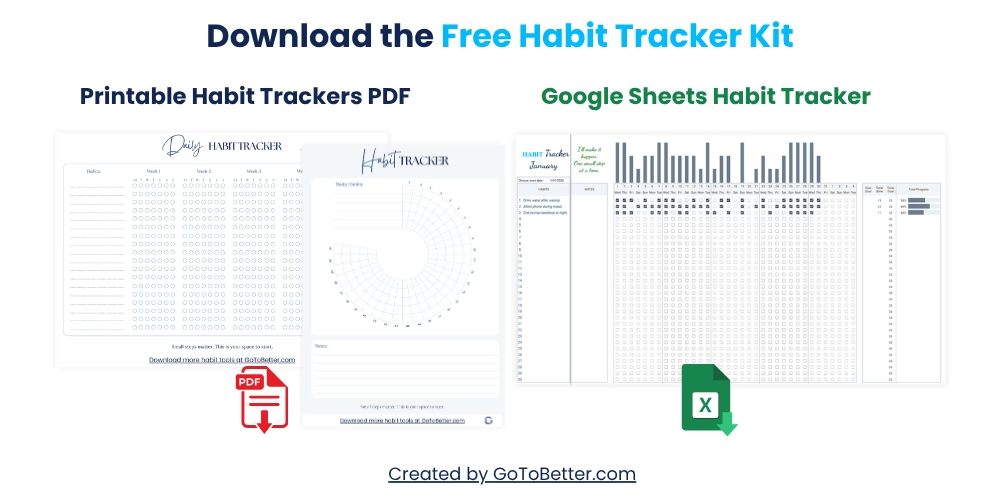
Before we go further, grab the Free Google Sheets Habit Tracker Kit — it includes:
- A ready-to-use Google Sheets tracker with space for weekly reflections
- Two printable PDF trackers — one minimalist grid, one 30-day circle
- A mobile-friendly layout that works on phone, tablet, or desktop
This isn’t about doing more. It’s about seeing more. One sentence at a time.
Write your email and get your Free Kit here↓
Where to Place Weekly Notes in Your Tracker
The key is visibility. If your reflection field is out of sight, it won’t get used.
You want it somewhere that feels part of your weekly habit flow — not a separate ritual. Most users place it:
- At the end of each week’s row (if your tracker is horizontal)
- In the final column of each week’s group (if vertical layout)
- Or as a simple “Week X Review” row beneath the tracked habits
The Ultimate Habit Tracker uses a pre-labeled “Review” column at the end of each weekly block. Just click and type. No format changes. No formulas. It’s already optimized for quick reflection.
If you’re designing your own, consider merging cells for each week’s note. One small row. 50–100 characters. That’s all you need.
GoToBetter says it like this: “If the reflection field isn’t visible — it won’t happen. Keep it in sight, not in a hidden tab.”
You can also freeze that section so it stays visible while scrolling. Or color it lightly to visually signal, “This is the check-in zone.” You’re building a habit of noticing — not just recording.
What to Write: Simple Weekly Prompts That Work
This isn’t journaling. You’re not writing paragraphs. You’re writing one sentence — the kind you’d say out loud in a text message.
Start with these light, honest prompts:
- What worked this week?
- What didn’t work — and why?
- Did this habit still help?
- Was this worth the effort?
- Did it even matter?
Don’t overthink it. Some weeks, your answer might be “No idea — too tired.” And that still counts. You showed up. You looked.
Here’s a short comparison table to help frame your thinking:
| Prompt | When to Use | Why It Works |
|---|---|---|
| What worked? | On weeks with small wins | Focuses attention on useful patterns |
| What didn’t? | After disruptions, skipped habits | Encourages awareness without blame |
| Was this worth it? | When motivation drops | Re-anchors to meaning, not performance |
| What surprised me? | When outcomes were unexpected | Opens space for discovery, not just tracking |
GoToBetter InsightStart with one recurring question like “What worked?” and use it every week. The consistency builds trust — not pressure.
Some users keep the same prompt every week. Others rotate. Both are fine. The goal is to stay present — not perfect.
Reflection, Not Journaling: Keep It Short
Most people skip reviews because they think they’re supposed to write something deep or wise.
You don’t.
This isn’t a place to write about your childhood, your values, or your goals. It’s a one-sentence pulse check. Like glancing in the mirror before you leave the house. Quick. Real. Enough.
The biggest mistake is turning reflection into a task. That’s when it stops serving you and starts demanding from you. And let’s be honest — that’s when you’ll stop doing it.
You can skip the questions about purpose, identity, long-term growth. This is not your journal. This is your habit sheet. Keep it light. Keep it brief. Keep it alive.
Some weeks, my reflection is literally:
- “Didn’t care. Did it anyway.”
- “Worked until Wednesday. Fell apart after that.”
- “Still don’t know if this habit matters.”
None of that is profound. But all of it is useful.
It shows me what’s real. It gives me just enough context to adapt without overhauling everything. And that’s what sustainable tracking is really about.
The goal isn’t eloquence. It’s honesty.
Real Examples of 1-Line Habit Reflections
Sometimes the hardest part is knowing what “counts” as a reflection.
So here are real examples I’ve actually written in my tracker:
- “Felt better on days I moved — even just stretching.”
- “Did it 3/7. But I’m still here, and that’s something.”
- “Was sick. Didn’t do anything. Still okay.”
- “Did everything — but rushed through it.”
- “Forgot to track, but remembered the habit.”
- “This week was survival mode. No notes.”
You might notice that none of these are about goals. None are about outcomes. They’re all about noticing. About seeing your week through a human lens, not a spreadsheet formula.
That’s what makes this tracker different. It respects your mess. Your effort. Your capacity.
Even the blank entries tell a story. That’s the point.
GoToBetter says it like this: “You don’t need to explain yourself to your spreadsheet. Just tell the truth, then move on.”
What matters is the habit of looking. The note itself can be rough, raw, half-finished. That’s still data — and it’s more honest than a perfect streak.
How to Add Weekly Reflections to Google Sheets
This quick method will help you create space for weekly reflection in any habit tracker — even if it’s a simple grid.
Step 1 – Open Your Habit Tracker
Use your existing tracker or download the Free GoToBetter Kit. If you’re using the Ultimate Habit Tracker, the reflection field is already included.
Step 2 – Choose Where to Place Your Weekly Notes
Most users place them in a column on the far right of their habit rows. You can also add a bottom row per week, or create a summary tab. The rightmost column keeps everything visible and simple.
Step 3 – Label the Notes Column
Use something clear and short like “Weekly Note” or “This Week’s Reflection.” Keep it visible — don’t hide it in a collapsed field.
Step 4 – Format the Cells for Text
Highlight the column → right-click → Format Cells → enable “Wrap text.” Adjust row height if needed so each note fits without overflow.
Step 5 – Write One Honest Line Per Week
At the end of the week, type one sentence. Use prompts like “What worked?”, “Still worth it?”, or “Harder than expected.” No editing — just a quick reflection before you close the file.
Step 6 – (Optional) Set Up Weekly Reset
If you prefer a fresh notes field each week, you can add a script or button to clear your reflections on Sundays. Not essential — but helpful if your tracker is part of a reset ritual.
Now your tracker includes weekly reflection inside the spreadsheet — no extra tools, no journaling, just one moment of honesty that adds real value.
Two Real-Life Reflection Moments
Here’s what it looks like in real life — no structure, no pressure:
- On Sunday night while watching Netflix, I scroll to the bottom of my tracker and just ask: “Did it help?”
- After a chaotic week of travel, I type: “Didn’t track anything, starting over next week.”
That’s it. No guilt. No overthinking. Just one line that reminds you you’re still paying attention — even when the week didn’t go as planned.
Bonus: My Favorite Question to Ask Every Week
This is the one I come back to every Sunday:
“Did it even matter?”
It sounds sharp. But it’s not cynical. It’s clarifying. Some habits feel useful but aren’t. Some look small but hold things together.
This one question makes me pause and answer honestly — even if the answer is “no” or “I don’t know.”
Sometimes I keep a habit just because it gives me momentum. Sometimes I drop it, because I’m chasing an identity that no longer fits. This question cuts through that noise.
Try it for a few weeks. You’ll see what stays. And what quietly fades — without guilt.
3 Myths About Weekly Reflection in Trackers
Let’s clear a few things up. You don’t need to be a “reflective person.” You don’t need a journaling ritual. You don’t need more time.
- Myth 1: You need a journaling habit.
No — one honest sentence is enough. - Myth 2: You should write something deep.
No — real beats deep. Always. - Myth 3: It takes too much time.
It takes 30 seconds max. If it takes longer, you’re overcomplicating it.
Weekly reflection isn’t about being insightful. It’s about staying connected — even when life’s messy. Especially then.
GoToBetter Mini Tool: The One-Minute Weekly Habit Debrief
This tool is for the end of your week. You only need 60 seconds. No journaling. No deep dive. Just answer this:
“Did this habit make any difference this week?”
Now write one honest sentence in your tracker. That’s it. No rules, no perfect format — just one note from the real you, to the future you.
If you’re not sure, here are a few ways to start:
- “This felt easier when…”
- “I forgot about it until…”
- “I noticed a shift in…”
- “Still hard, but…”
- “Didn’t matter this week.”
Use whatever fits. The goal isn’t to reflect perfectly — it’s to stay connected. One sentence, one week at a time.
Want to Keep Going? Here’s What Helps
This article is part of the GoToBetter Google Sheets Habit Tracker series — a practical system for turning daily checkmarks into real insight.
If you want to understand the full method — not just how to track, but how to make it work in real life — start here:
Read The Ultimate Guide to Google Sheets Habit Tracker — your no-fluff, real-life guide to building a system that actually helps you grow.
Or, if you just want the tools to start right now, grab the Free Google Sheets Habit Tracker Kit — zero setup, full clarity:
- A ready-to-use Google Sheets tracker with visual progress bars
- Two printable tracker PDFs (minimalist grid and 30-day circle)
- Mobile-friendly, pressure-free, and ready to go
No apps. No noise. Just a clean way to track what matters.
Get your Free Google Sheets Habit Tracker Kit:
Habit Tracker with Notes in Google Sheets FAQ
How do I add notes in Google Sheets without cluttering the tracker?
Add a simple “Notes” column next to your weekly totals or reflections. One sentence per week is enough, and placing it where you already look avoids visual overload. Keep the text short to maintain mobile readability.
Do weekly notes in a habit tracker really help?
Yes. Weekly notes offer quick insight into what’s working and what’s not. Even one sentence like “Felt rushed this week” can help you make smarter adjustments. Over time, you’ll spot patterns you’d otherwise miss.
What should I write in the notes section of my habit tracker?
Write anything that helps you understand the week: “Skipped twice,” “Energy was low,” “Worked better when I started early.” These micro-reflections make your tracker more human and useful — without adding pressure.
Should I make daily or weekly notes in my tracker?
Weekly is enough. Daily notes often create pressure and clutter. A short weekly review lets you step back and see the bigger picture — without turning your tracker into a journal.
Is there a habit tracker that already includes a notes feature?
Yes — the Ultimate Habit Tracker from GoToBetter has a built-in space for weekly reflections. You don’t need to customize anything — just start typing. It’s made for quick notes, even on your phone.
Ready to Go Deeper?
When daily check-ins start to feel grounding — not exhausting — it might be time to build something more complete.
That’s where the Ultimate Habit Tracker comes in.
Designed for real-life rhythms (and real-life chaos), it lets you:
- Track multiple habits with clarity
- Reflect without overthinking
- See patterns across sleep, mood, energy, and effort
- Adjust your routines without starting over
You don’t need a perfect system. You just need one clear view — and space to grow inside it.
Check out the Ultimate Habit Tracker
Or explore all habit tools in the GoToBetter Shop — built for real life, not perfection. From quick daily check-ins to full reflection systems, there’s something to fit your flow.