
+Free Google Sheets Habit Tracker Kit (printable & editable)
Whether you want to create a daily habit tracker in Google Sheets for the first time—or finally escape messy, overcomplicated templates—this guide is for you. Inside: calm step-by-step instructions, personal tips, and a free printable + digital tracker kit.
By GoToBetter | Built from real mistakes, designed for real life
Daily Habit Tracker Google Sheets: What Really Works (And Why Simple Wins)
Let’s be honest—most “build a tracker” guides throw features at you until your sheet is a mess of colors, formulas, and tabs you’ll never open again.
My first Google Sheets tracker had it all: streak counters, reward boxes, conditional formatting, and tabs for every habit I could dream up. It also lasted… three days.
That’s the catch: what looks smart on paper rarely works when life gets noisy.
A daily habit tracker is only useful if you’ll actually open it—on your messiest days.
This guide is for anyone tired of complex systems, burned out on apps, or starting fresh. We’ll keep it beginner-friendly, visual, and friction-free. No code, no clutter, no guilt trips.
And to make it easier, you get the Free Google Sheets Habit Tracker Kit: everything you need to start tracking today, both digital and printable.
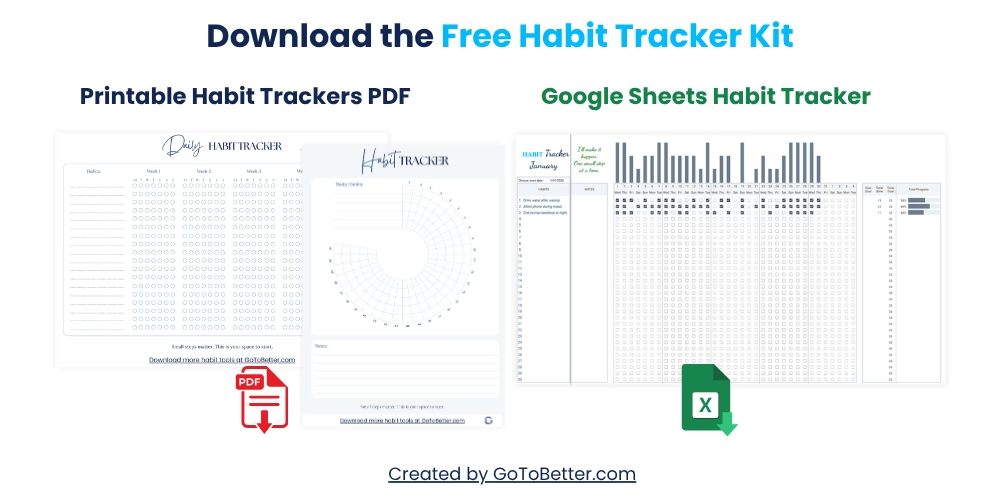
- A ready-to-copy Google Sheets daily tracker—just add habits, mark checkboxes, and see your progress in real time.
- Two printable tracker PDFs: a daily minimalist grid and a 30-day visual circle. Use them on your desk, in your journal, or digitally.
- Works for any habit, at any level—no tech stress, just results.
Write your email and get your Free Kit here↓
What Is a Daily Habit Tracker in Google Sheets?
A daily habit tracker in Google Sheets is a simple, custom-built spreadsheet that lets you check off habits one day at a time—using dates, checkboxes, and basic visual feedback. Instead of a crowded app or overwhelming template, you get a clear view of what matters today.
Why does this matter? Most people quit tracking because their system feels like a second job. The best daily tracker is the one you’ll open on autopilot—because it’s fast, visual, and built just for you.
Picture a grid: habits down the side, days across the top. Every morning, you scan your list. No distractions. Just one click to record what you did—and, if you missed a day, no big deal.
GoToBetter says it like this: “Building your own tracker is how you find what actually matters to you.”
If you’re searching for a simple spreadsheet tracker you can actually stick with, this is it. That’s why people looking for a beginner spreadsheet habit tracking method usually end up ditching complex apps for something they built themselves—even if it starts on the back of a napkin.
Most guides will try to sell you a pre-made system, but the truth is, the first version that sticks is usually the one you made, not the one you downloaded.
Research from habit formation experts like James Clear shows that tracking daily habits works best when it’s easy to start, easy to see, and easy to adjust as your life changes. That’s exactly what a minimalist, editable daily tracker in Google Sheets provides.
Before you chase complicated features, start with the basics: one sheet, your habits, your actual life. Simplicity always wins.
Why Build Your Own Before Using a Template or App?
Every tracker guide online promises “fast results” if you just download the right template. Here’s what they don’t say: those templates are built for “everyone”—which usually means nobody.
When you build your own tracker, you control everything: the number of habits, the look and feel, even how you define “success.” You skip the features that slow you down, and you learn what matters by doing, not by reading someone else’s rules.
It’s tempting to go straight for pre-made solutions. Most of us have tried—and most of us quit. My first tracker was a Frankenstein mix of fancy templates and borrowed hacks. It felt clever for a week. Then it became another file I stopped opening.
Go simple first. Use the Google Sheets checklist tutorial below as your practice round. Get a feel for what works, what annoys you, and what habits you actually want to see each day.
GoToBetter InsightStart with just three daily habits. If you still show up after a week, add a fourth. Tracking too many at once usually leads to none at all.
Some mornings, it feels like you need to overhaul your whole routine. The reality? A simple spreadsheet tracker you made yourself is more likely to be used than the “perfect” system you downloaded from a blog.
Eventually, you might want to upgrade to a tracker with advanced features, visualizations, or automation. That’s when a well-designed product (like the Ultimate Habit Tracker) makes sense. But the only way to know what you need is to live with your own version first.
GoToBetter says it like this: “Start with less—upgrade only when you know what’s worth adding.”
Step-by-Step: How to Create Your Own Daily Habit Tracker in Google Sheets
Here’s the heart of the process: a clear, no-nonsense guide for building your daily habit tracker Google Sheets—no code, no frustration, no distractions.
How to Build a Daily Habit Tracker in Google Sheets
Follow each step to create your own clean, minimalist daily habit tracker. Adapt as you go—nothing is locked in stone.
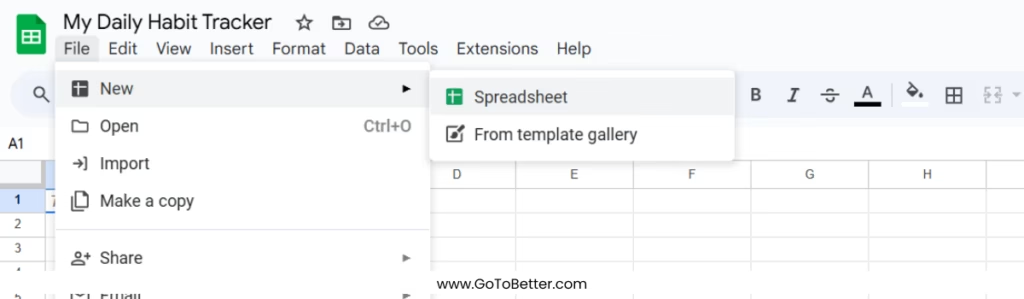
Step 1 – Create Your Sheet
Open Google Sheets and start a new blank spreadsheet. Name it something obvious like “My Daily Habit Tracker.”
Step 2 – Set Up Your Layout
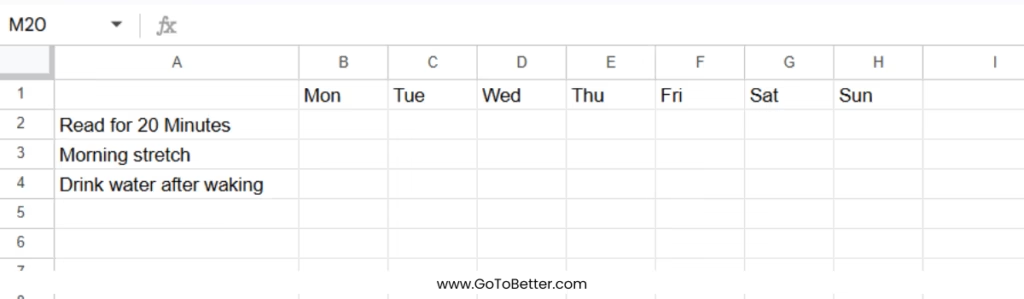
In the first column (A), list your habits vertically starting from row 2. In row 1, use columns B onward for each day of the week (e.g., Mon, Tue, Wed, …). This simple grid makes it easy to see your daily routine at a glance.
Step 3 – Add Checkboxes
Select the range where you want to check off habits. Go to “Insert” > “Checkbox” in the menu. Now you have a visual, clickable box for each habit, each day.

Step 4 – Customize for Visual Calm
Use soft background colors or simple gridlines, not bold reds or neon greens. The goal: a calming, print-friendly habit tracking space you’ll want to return to daily.

Step 5 – Add a Simple Progress Bar (Optional)
To track completion rates, you can add a formula (like =COUNTIF(range, TRUE)/number_of_days) at the end of each row to see your streak. Keep it simple—no advanced automation.

Step 6 – Make It Mobile-Friendly
Test your tracker on your phone’s Google Sheets app. If the checkboxes are too small, increase row height or font size. You want quick taps, not zoom-and-scroll.
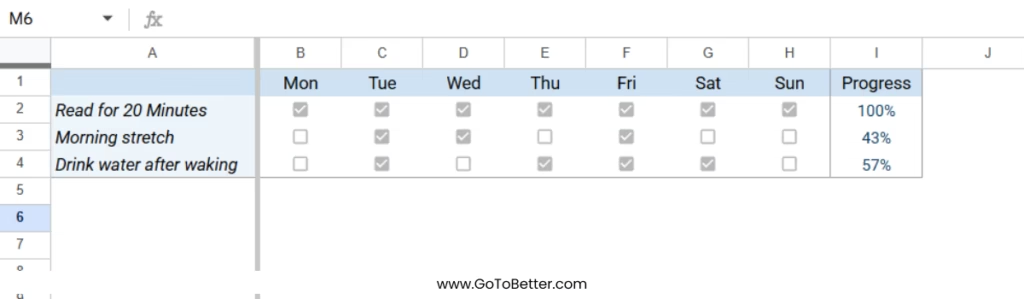
You might notice that after the first week, your daily progress tracker setup reveals which habits you enjoy ticking off—and which you avoid. That’s insight, not failure. Adjust as you go.
Here’s a quick table to help you decide which habits are worth tracking daily (not weekly or monthly—save those for other trackers):
| Habit | Track It? | Why |
|---|---|---|
| Drink Water | Yes | Simple, clear, daily behavior with visible benefits. |
| Read 10 Pages | Yes | Easy to measure, motivates small daily progress. |
| Weekly Planning | No | Better suited to a weekly tracker—keeps this one uncluttered. |
| Sleep by 11pm | Yes | Consistent daily tracking helps build the routine. |
| Family Dinner | No | Save shared/family tracking for a separate system. |
As you build, resist the urge to add every habit or detail you can imagine. Focus on clarity, not complexity.
How to Avoid Common Mistakes and Over-Complication
Most people—me included—ruin their first tracker by adding too many habits, advanced formulas, or fancy formatting. More features usually means more friction, not more progress.
Common mistake #1: Tracking everything at once. Choose 3–5 habits max. You can always add more later if you genuinely miss seeing them.
Common mistake #2: Chasing automation. Sure, you can write a script or add a conditional color. But every “extra” is one more thing that can break, confuse, or slow you down.
GoToBetter InsightTry rows for habits and columns for dates. If you skip a day, just leave it blank—no “streak” punishment. Progress is about showing up, not perfection.
One quick test: If you have to explain your tracker to someone, and it takes more than 60 seconds, it’s probably too complex. Simplify.
Even a no-template habit tracker can become overwhelming if you let feature creep in.
GoToBetter says it like this: “If your tracker feels heavy, you won’t come back. Simplicity wins.”
Reflection question: Is there any part of your tracker you dread filling out? If so, that’s your signal to cut it. Don’t build for a perfect week—build for your worst day.
Printable and Mobile Use: Which Format Fits You?
Not everyone wants to track habits in a spreadsheet—especially after a long day on screens. Some find more peace in print-friendly habit tracking or a physical journal.
The best part about the Free Google Sheets Habit Tracker Kit: you get both options. Use the sheet for quick, daily check-offs, or print the minimalist grid for your desk or notebook. You can even fill in the printable version digitally on your tablet or phone.
Often, the simplest way is the one that matches your life. If you’re traveling, snap a photo of your paper tracker and update the sheet later. If you do everything on your phone, keep the sheet bookmarked on your home screen.
This is not an all-or-nothing choice. The right tool is the one you’ll actually use—and sometimes that changes week to week.
Think of your tracker as a note on your fridge: always in sight, always simple. When you make it easy to see progress, you make it easier to keep showing up.
When to Upgrade: Moving from DIY to a Pro Tracker
Building your own tracker gives you control. But eventually, you may want more: automated summaries, monthly stats, or visual dashboards.
That’s when it makes sense to invest in a ready-made tool like the Ultimate Habit Tracker or Minimalist Tracker—not because you “failed” at DIY, but because you now know what features actually matter to you.
The goal isn’t to use the same sheet forever. It’s to get so clear on your daily habits that you recognize when a better system will genuinely help. That’s progress.
Metaphorically, building your first tracker is like learning to cook with just salt and pepper—only after you know your taste do you reach for the spice rack.
Reflection: If you start feeling limited by your homemade tracker, write down exactly what you wish was easier. That’s your upgrade checklist—use it to choose the right next tool, not the flashiest.
GoToBetter Mini Tool: Daily Tracking Reality Check
When you see a long list of habits in your tracker, pause and ask: Are these really meant for every day? Use this tool to test which habits actually belong on your daily list.
- Pick one habit you plan to track today. Write its name at the top of a page or in your sheet.
-
Ask yourself:
- Do I genuinely want to notice this habit every single day?
- Does tracking it daily feel motivating, or like a chore?
- If I missed a day, would I care—or just feel guilty?
- Is daily the right rhythm, or would weekly feel better?
- Mark the habit today. As you do, notice your reaction—pride, relief, annoyance, indifference?
- At the end of the day, jot down a sentence: “This habit feels right to track daily / weekly / not at all.” If it doesn’t spark interest or value, consider moving it off your daily list.
Use these questions any time your tracker starts feeling heavy. Daily tracking works best when every habit on the list is one you want to notice—on your best and messiest days.
Want to Keep Going? Here’s What Helps
This guide is just one part of the complete GoToBetter system for building daily habits that actually last—without overwhelm or clutter.
If you want the whole method and more real-life solutions, start here:
Read The Ultimate Guide to Google Sheets Habit Tracker — it covers daily, weekly, and advanced tracking methods, so you can pick what actually fits your life.
Or if you’re ready to start now—whether you’re a digital person, a paper person, or just need a gentle nudge—grab the Free Google Sheets Habit Tracker Kit. You’ll get:
- A fully editable daily tracker for Google Sheets (up to 30 habits, one-click tracking, real-time progress bars)
- Two minimalist printable PDFs—a daily grid and a visual 30-day circle
- Instant access, zero setup, and designed for both clarity and speed—works on any device, or on paper
Ready to see what works for you? Enter your email and get the free kit below. You can always upgrade later, but start simple—and make it real.
Daily Habit Tracker Google Sheets FAQ
How does habit tracking work in Google Sheets?
Habit tracking in Google Sheets is based on a simple grid: your habits are listed vertically, and dates are listed horizontally. You mark each habit as done by checking a box each day. This lets you quickly spot patterns, gaps, or trends without extra apps or accounts.
What habits should I track daily versus weekly?
Track only habits you want to build every single day—like hydration, reading, or exercise. Save tasks that happen less often (e.g., planning, cleaning) for a separate weekly tracker. Keeping your daily sheet focused makes it easier to stick with.
Can I use my Google Sheets habit tracker on my phone?
Yes. Google Sheets works on both Android and iPhone, so you can mark your progress on the go. Just adjust row height or font size for easier tapping. All changes save instantly to your Google Drive.
How do I print my daily habit tracker?
Set your print area to include your habits and dates, then print directly from Google Sheets or download as a PDF. For a neater layout, use the printable PDFs included in the free kit—they’re sized for easy desk or journal use.
When should I switch to a more advanced habit tracker?
Upgrade when your needs change—like wanting monthly reviews, color-coded insights, or automated dashboards. The right time is when your current tracker feels limiting, not just because a new tool looks fancier. Choose what supports your actual habits.