
+Free Google Sheets Habit Tracker Kit (with 2 printable PDFs)
Google Sheets habit tracker problems usually start when the setup gets too complex, too fast. Whether you’re stuck in spreadsheet overwhelm or frustrated your tracker just isn’t clicking—this article breaks down the 5 most common reasons why it fails, and how to fix each one without starting over.
By GoToBetter | Built from real use, not just theory
Why Google Sheets Habit Trackers Fail (And It’s Not What You Think)
Let’s be honest—if you’re here, it’s probably not your first attempt. You set up a habit tracker in Google Sheets. You even color-coded it, maybe added a progress bar, maybe tracked ten habits across three tabs.
And for a few days… it felt good. It looked good.
But now? You’re not updating it. You’re avoiding it. Or you’ve stopped using it entirely.
This isn’t about discipline. It’s not that you’re lazy or bad at habits.
Most spreadsheet trackers fail because they ask too much, too soon—without offering anything back.
And it’s fixable. Without a rebuild. Without formulas. Without guilt.
Before we dive into the 5 mistakes that kill even the best-looking trackers—start with the tool that actually works in real life.
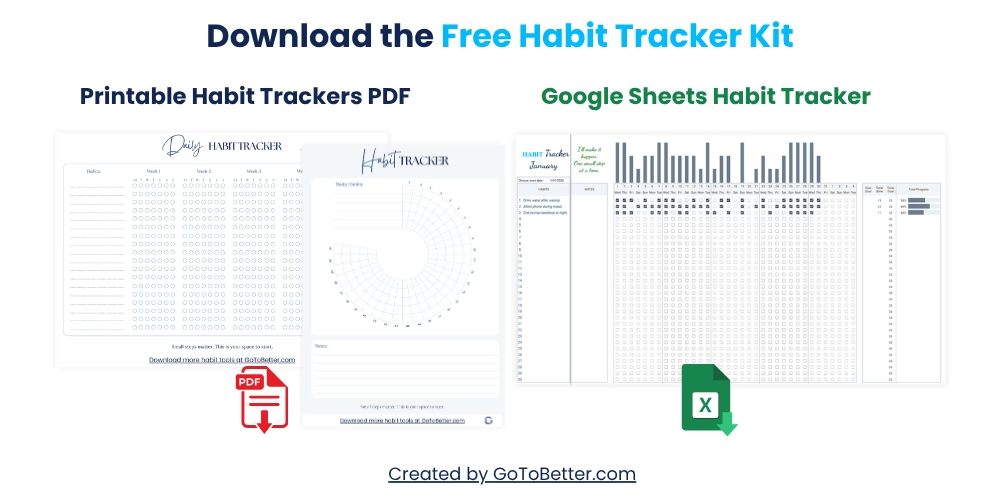
Download the Free GoToBetter Google Sheets Habit Tracker Kit:
- A simple, mobile-friendly Google Sheet with one-click habit tracking and clean visual progress bars (no setup needed).
- Two printable PDF trackers: one minimalist daily grid, one 30-day circle — perfect for paper journaling or digital fill-in.
Start small. Track clearly. And use something you’ll actually want to open.
Write your email and get your Free Kit here↓
Mistake #1: Too Many Features, Not Enough Flow
That moment when your tracker has more tabs than your browser? That’s the first red flag. It’s easy to fall into the trap of turning your spreadsheet into a productivity dashboard — habit names, checkboxes, conditional colors, formula-based graphs, priority tags, weekly views, streak logic, and reward columns. It looks advanced. It feels smart.
But once it takes five clicks just to check a box, you’re no longer tracking habits — you’re maintaining a system.
Overengineering is one of the most common spreadsheet habit tracker mistakes. You want to feel in control, so you add features. But those features slowly add friction. You skip one day. Then another. Suddenly, the tracker becomes something you’re avoiding.
GoToBetter says it like this: “Overdesign is the silent killer of most spreadsheet trackers.”
You might have started with a simple checkbox sheet. Then thought: “What if I color-code the streaks? What if I build a chart? What if I rank habits?” And suddenly the tool that was supposed to help you show up — now needs its own manual.
GoToBetter InsightStart with one view, one action, and one update method. Add more only after it feels effortless for a week.
Real-life? I once built a tracker with 12 habits across 3 sheets. Color-coded. Auto-calculated. It broke when I forgot a formula. I never fixed it. I just stopped.
Flow comes from simplicity. And when the interface feels like walking through mud — it’s time to redesign for speed, not control.
Mistake #2: No Visual Enjoyment
Let’s talk about vibe. If your tracker isn’t visually pleasant, you won’t want to open it. It’s that simple. A spreadsheet might not be Instagram-worthy, but it still has to feel good to use.
We’re not talking aesthetics for the sake of pretty. We’re talking ease, clarity, visual feedback — things that make your brain relax and engage.
Cluttered grids, tiny font, 9 shades of orange… it’s like opening a tax document every morning. Not motivating. Not fun. And definitely not something your tired brain will lean toward.
GoToBetter says it like this: “If your tracker feels like a chore, it’s already failing.”
Clean white space, simple rows, one or two colors — that’s enough. Some people even remove the gridlines for a smoother view. The key is making it feel open, not overwhelming. Like a note on your fridge — always in sight, never demanding.
You can even try this: open your tracker, close your eyes, and then open them again. What pulls your attention? Is it clear? Is it calm? Is it kind to your eyes?
If not — simplify it. Visual comfort increases return rate. And if you want to track consistently, your sheet should be a place you want to be.
Mistake #3: Tracking Too Much, Too Soon
10 new habits. All at once. Tracked daily. Across four weeks. It’s ambitious. It’s hopeful. And it usually collapses within days.
Google Sheets tracking problems often come from scope, not setup. When you track too many habits, especially from day one, it becomes a wall of data rather than a reflection of your life.
It’s tempting — the fresh start energy. But overwhelm kills momentum. You miss one. Then three. Then the sheet feels like a reminder of failure, not progress.
Here’s a better approach:
| Habit | Track It? | Why |
|---|---|---|
| Drink water | Yes | Simple to complete, builds momentum |
| Daily journaling | No (initially) | Too time-intensive for a first tracker |
| Evening phone limit | Yes | One-tap accountability, tied to environment |
Start with what’s clear and achievable. Track two or three habits max. Once that feels boringly easy — then add more.
Your tracker isn’t a resume. It’s a mirror. You’re not trying to impress anyone. You’re just trying to stay in motion.
And if you drop a habit for a week, the solution isn’t “try harder.” It’s “track less.”
Less tracking, more returning.
Mistake #4: No Ritual, No Return
Ever wonder why some tools just become part of your day — and others fade away?
The difference is ritual. A spreadsheet habit tracker without ritual is just another file you forget to open.
Think of it like brushing your teeth. You don’t need a reminder. It’s a sequence you repeat. There’s a rhythm. A cue. That’s what your tracker needs, too — a moment, a placement, a pattern that brings it back into your day.
Not motivation. Not willpower. Just: “This is what I do when I sit down with my coffee.”
GoToBetter InsightPlace your tracker shortcut next to something you open daily — email, calendar, or notes. Make it part of an existing motion, not a separate task.
Some mornings, you’ll forget. That’s fine. But if your brain connects “sit at desk → open tracker,” then over time, your spreadsheet becomes more than data — it becomes identity.
And when the habit of tracking is the habit itself? You’re winning.
Mistake #5: Doesn’t Work on Mobile (or Your Real Life)
You’re lying in bed. You remember you forgot to check your tracker. But the file’s on your laptop. Or worse — it opens slowly on your phone and breaks the formatting.
You skip it. One day becomes three.
One of the biggest spreadsheet habit tracker mistakes is not building for the way you actually live. If your tracker doesn’t work on mobile, it doesn’t work.
Even worse? When it takes so many taps that you give up before even seeing your progress.
Habit tracker setup tips usually ignore one critical rule: if it’s not frictionless, it’s optional. And if it’s optional, you won’t stick with it on hard days.
Here’s what helps: test your tracker like a lazy version of yourself. Open it on your phone. Try checking off a habit. Did you give up? Or did it take 5 seconds?
GoToBetter says it like this: “You don’t need more formulas. You need fewer friction points.”
Design for the life you actually have — not the version you’re hoping for next month. Morning chaos, kid interruptions, sleep-deprived evenings. That’s the environment your tracker must survive.
And if it’s not mobile-friendly? You’ll outgrow it in three days flat.
How to Simplify Your Google Sheets Habit Tracker
This guide will help you strip down your tracker to what actually works — without starting over.
Step 1 – Delete Features You Don’t Touch
Remove unused tabs, graphs, or formulas. Keep only what you use daily. The goal isn’t completeness — it’s usability.
Step 2 – Limit Habit Count to 3
Keep your focus narrow. Three habits max until it becomes second nature. Simplify to sustain.
Step 3 – Fix Mobile Access
Open your tracker on your phone. Adjust column width and font size until it’s tappable with one hand. Add a home screen shortcut for faster access.
Step 4 – Replace Visual Clutter with White Space
Reduce gridlines. Use soft contrast. Remove decorative fonts. Your eye should feel calm when you open the file.
Step 5 – Create a Habit Cue
Pair opening your tracker with something you already do — like your morning coffee or opening your to-do list. The cue creates consistency.
Real Examples: When Simplicity Wins
A friend of mine tracked her habits in a rainbow-coded sheet. Twelve columns. Each habit had a score. After a week, she hadn’t filled in anything — “I don’t even know what half these colors mean anymore.”
She replaced it with three columns: Habit, Done?, Notes. Black and white. Simple. She’s been using it for two months straight.
Another person I worked with kept a tracker with a “weekly mood average” calculated from ten data points. It broke every time she missed one cell. She now tracks one thing only: whether she opened her journal. No numbers. Just presence.
These stories aren’t about minimalism. They’re about honesty. Your best tracker is the one you’ll open tomorrow. Not the one that impresses you today.
And sometimes, that means deleting 80% of what you built. Not because it was wrong — but because it no longer fits how you live.
Mistake #6: Confusing Output With Outcome
Ticking a checkbox isn’t the same as growth.
One of the easiest mistakes to make with spreadsheet trackers is chasing data instead of change. You hit “done” every day, but nothing in your life feels different.
Why? Because you were tracking the output — not the real outcome you cared about.
Did you write 10 minutes, or did you make progress on your story? Did you meditate, or did you just sit with your eyes closed waiting for the timer?
Trackers aren’t bad for this — but they need help. Add a small column or space for one question: “Did this move me forward?”
GoToBetter says it like this: “Data without direction is just decoration.”
Use your spreadsheet to build awareness, not just streaks. Because a perfect row of checkmarks is meaningless if your life still feels stuck.
Outcome = what changed in you, not what you marked off.
Mistake #7: No Notes, No Context
Have you ever looked back at your tracker and thought, “I don’t remember what happened that week”? That’s the problem.
Most people skip the notes column. It feels optional. Slows you down. But without a few words of context, your tracker turns into mystery math.
Why did you miss five days? Why did you stop journaling in March? Why did your energy crash?
Context doesn’t have to be deep. One sentence. A few keywords. “Sick.” “Overslept.” “Travel.” “Low mood.” Done.
GoToBetter InsightYour tracker isn’t just a log — it’s a learning tool. Without notes, you’ll keep making the same mistakes and never see the patterns.
Make room for notes. It’s the difference between self-awareness and self-judgment. It’s also the fastest way to spot what’s helping… and what’s just performative tracking.
Mistake #8: Too Much Time on the Template
This one stings. You open your spreadsheet, ready to track your habits. But then… you start adjusting fonts. Changing the layout. Tweaking the colors. Adding new tabs.
An hour later, you haven’t tracked anything. You’ve just redesigned the container.
Design can help — but not when it replaces the actual work. And honestly? That gorgeous tracker won’t help you if it’s too precious to use on messy days.
This is the productivity trap in disguise: improving the system instead of doing the habit. You feel accomplished. But you haven’t moved.
GoToBetter says it like this: “You don’t need a better spreadsheet. You need a smaller resistance gap.”
Your tracker is a tool. It should be boringly usable. Don’t decorate it to death.
And if you keep editing your template every week? That’s a sign the habits aren’t the problem — your relationship with perfectionism is.
Mistake #9: Trying to Track Everything at Once
You open your new habit tracker and feel ambitious. This is it. The year you fix it all.
You add 12 habits. Morning routine. Water. Sleep. Reading. Stretching. Gratitude. No sugar. No screens. The list scrolls off the page.
By day 3, you’re already behind — and worse, you’re overwhelmed by your own system.
This is the illusion of “starting strong.” But in reality, you’ve just built a tracker that assumes you’ll be perfect on your messiest days. That never works.
Track 1–3 things. That’s it. If it’s working, you’ll feel momentum — not pressure. And when it’s not working, your tracker won’t become a wall of failure.
GoToBetter says it like this: “Your tracker should be light enough to carry when everything else feels heavy.”
Don’t track what you wish you could do. Track what you’re actually ready to commit to. That’s how real change sticks.
Mistake #10: Treating Tracking as a Test
Some people open their tracker and immediately feel judged. Red Xs. Missed days. Incomplete rows. It looks like failure — even if it’s just life happening.
This is the final and most painful mistake: treating tracking as a test you have to pass.
If your tracker makes you feel bad, you won’t open it. That’s not laziness — it’s self-protection. Shame is not a motivator.
What if your tracker was a conversation, not a scorecard? What if it helped you notice patterns, adjust gently, and keep showing up — without grading yourself?
Try this shift: remove red. Remove harsh language. Rename your “missed” column to “paused.” Add a note field that says “why it didn’t happen.” Be human.
GoToBetter InsightYour spreadsheet should reflect your growth — not punish your mess. The real test is whether you came back, not whether you were perfect.
You don’t need a gold star tracker. You need a kind one. One you’ll return to — even on bad days.
What Actually Works: Keep It Boring, Keep It Yours
The best spreadsheet habit trackers aren’t flashy. They don’t go viral. They probably look a little plain.
But they work — because they fit your life, not your ideal.
If you want a tracker that lasts, build it like a favorite mug: comforting, easy to use, never stressful to look at. No performance. Just presence.
You don’t have to track perfectly. You just have to come back. And when your tracker makes that feel easy — that’s when it starts changing things.
GoToBetter Mini Tool: The 3-Dot Habit Check
Want to know if your tracker is actually working for *you* — or just looking good on screen? Try this 1-minute test. All you need is your tracker (open or printed), and a few seconds to check in.
- Look at your tracker. Find today’s row or box.
- Without thinking too hard, mark it with:
- ✓ if you did your habit
- • if you noticed the cue but didn’t act
- — if it wasn’t relevant today
- Ask yourself: “Do I need to change the habit — or just notice it more?”
This 3-dot system works even if you skip days. It’s not about perfect streaks. It’s about showing up honestly — so the tracker becomes a mirror, not a judge.
Want to Keep Going? Here’s What Helps
This article is part of the GoToBetter Google Sheets Habit Tracker Series — built for clarity, not complexity.
If you’re curious about the full method behind simple, friction-free tracking, start here:
Read The Ultimate Guide to Google Sheets Habit Tracker — your no-fluff, real-life guide to building habits that work even when your energy is low.
Or, if you just want the actual tools right now, grab the Free Google Sheets Habit Tracker Kit — no login, no friction, just plug-and-play:
- 1-click Google Sheets tracker with automatic visual bars
- Minimalist printable daily grid PDF
- 30-day circle tracker you can use on paper or screen
Built for real life — not productivity pressure. Whether you’re starting from scratch or rebuilding a habit, this kit keeps it light and doable.
Simple Google Sheets Habit Tracker FAQ
Do I need formulas to track habits in Google Sheets?
No, you don’t need any formulas. A good tracker can work with basic checkboxes, dots, or color codes. In fact, avoiding automation makes it easier to stay present with your habits.
Can I use this tracker offline?
Yes. Once you open your Google Sheet while connected, it stays available offline if you have offline mode enabled. For full flexibility, the kit also includes printable PDFs you can use on paper.
How simple is too simple?
If you can understand your tracker at a glance and use it daily without resistance, it’s not too simple. Even a dot or checkmark can be powerful when done consistently.
What if I miss a few days?
That’s normal — and expected. This tracker is designed without streak pressure. Just mark a blank, and pick up again. It’s more about pattern awareness than perfection.
How is this different from the Ultimate Habit Tracker?
This version is intentionally minimal — one sheet, one table, no automation. The Ultimate Habit Tracker adds multiple views, dynamic visuals, and deeper habit reflection. This one is for when you need ease over detail.
Ready to Go Deeper?
When daily check-ins start to feel grounding — not exhausting — it might be time to build something more complete.
That’s where the Ultimate Habit Tracker comes in.
Designed for real-life rhythms (and real-life chaos), it lets you:
- Track multiple habits with clarity
- Reflect without overthinking
- See patterns across sleep, mood, energy, and effort
- Adjust your routines without starting over
You don’t need a perfect system.
You just need one clear view — and space to grow inside it.
Try the Ultimate Habit Tracker or explore all habit tools in the GoToBetter shop — built for real life, not perfection.