
+Free Google Sheets Habit Tracker (printable & editable)
Trying to track habits as a family can quickly turn into chaos — unless your habit tracker is built for real life. This article shows how to set up a shared Google Sheet that’s clear, gentle, and actually works for households with kids, parents, and everything in between.
By GoToBetter | Designed for messy real life, not perfect routines
Why Use a Family Habit Tracker Spreadsheet?
Trying to track habits together sounds like a good idea — until you’ve got five people, one Google Sheet, and everyone asking “Wait… where’s my part?”
That’s where things usually fall apart. You get cluttered columns, missed check-ins, or worse — one person becomes the “reminder system” for everyone else.
But when it’s set up the right way, a family habit tracker can actually make things easier. It reduces questions, cuts down on friction, and helps everyone feel a little more seen — without guilt or pressure.
This article shows you exactly how to build that kind of system. We’ll walk through shared layout strategies, color-coded examples, and real-world tips for making one tracker work for the whole house.
And if you’re starting fresh — or starting over — we’ve made it even easier.
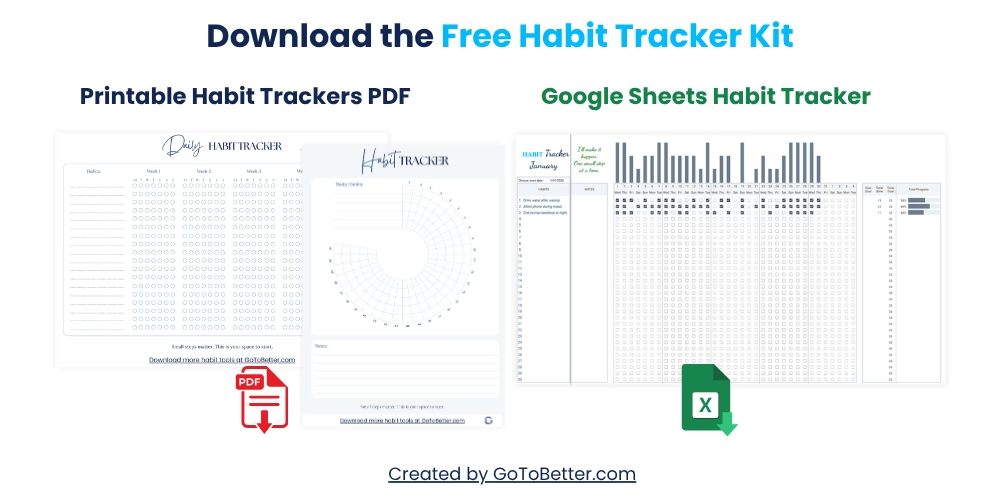
Before you scroll further, grab your free GoToBetter Habit Tracker Kit — designed for clarity, speed, and ease.
Here’s what’s inside:
- A ready-to-use Google Sheets Habit Tracker
— track up to 30 habits, click to complete, and get instant visual feedback. - A minimalist printable daily tracker
— easy to stick on the fridge or use in a journal. - A circular 30-day visual tracker
— perfect for paper lovers who like a quick view.
No logins. No setup. No judgment.
Write your email and get your Free Kit here↓
How to Avoid Passive-Aggressive Reminders (Without Letting Things Slide)
Tracking habits as a household sounds cooperative — until one person becomes the unofficial “project manager.” Suddenly, reminders turn into nagging, and the whole thing feels more like performance than progress.
But it doesn’t have to. A family habit tracker spreadsheet can actually remove the need for constant reminders — if it does the reminding itself.
One of the best strategies? Let the tracker act as the messenger.
Instead of asking, “Did you do your part today?” just glance at the shared sheet together during dinner, or before bed. No words needed. If a box isn’t filled in, it speaks for itself — and without tone.
GoToBetter says it like this: “The best reminder is the one that doesn’t feel personal. A tracker speaks gently — it doesn’t accuse.”
Some families create a neutral check-in routine:
- Everyone opens the spreadsheet for 30 seconds at the same time each evening.
- No questions, no explanations — just a quick look.
- Color fill = done. Empty = okay. That’s it.
You can even build this into a routine like brushing teeth or putting away phones. When the tracker becomes part of your home rhythm, no one has to be the “accountability person.” And when the family habit tracker spreadsheet is simple and visible, it quietly replaces the need for reminders entirely.
GoToBetter InsightSet one shared time for everyone to view the tracker — not to talk about it. Silence keeps it safe, and presence makes it work.
What if someone skips a day? Don’t fill it for them. That’s their space. Let it stay blank. Over time, that blank square becomes their own signal — not a punishment, just a reflection.
Think of it like a mirror: it shows you what’s happening, but it doesn’t comment. That’s the kind of tool that builds self-awareness without guilt.
Some nights, the tracker will stay closed. That’s okay too. If it becomes a weapon, drop it. If it becomes a quiet signal, keep going.
You don’t need to motivate each other — just stay gently visible to each other. That’s often enough to keep things moving.
How to Organize a Shared Sheet Without Losing Your Mind
The #1 reason most family habit trackers fail? Chaos. One person uses checkboxes, another types “done,” someone adds emojis… and suddenly it’s unreadable.
That’s why visual consistency matters more than you think. A good family habit tracker spreadsheet isn’t about design — it’s about clarity.
Start with color coding. Assign each person their own color and keep it consistent across all tabs or rows. No fancy gradients or rainbows. Just simple, solid fills that don’t change week to week.
If you’ve got more than 3 people, don’t cram everyone into one page. Use separate tabs for each person, or split the sheet by week so only the current group is visible at a time.
GoToBetter says it like this: “In a shared tracker, clarity is kindness. If someone has to ask, ‘Where’s my space?’ — the system failed.”
You might notice it helps to keep one “master view” tab. This shows just the current week — one row per person — pulled in with simple formulas like =IMPORTRANGE or =ARRAYFORMULA. It’s not essential, but it can reduce the overwhelm when people don’t want to scroll through endless columns.
Here’s a simple structure you can try:
| Tab Type | What to Include | Why It Helps |
|---|---|---|
| Individual Tabs | One tab per person, with 7-day layout | Reduces clutter, gives everyone space to choose their habits |
| Color Codes | Each person picks a color for their fill cells | Quick visual scan = instant recognition |
| Master View | Auto-pull one row per person from their tab | Shows progress across household without digging |
One more tip: set up conditional formatting in advance. If someone types “✓”, it turns green. If left blank, it stays neutral. That tiny automation reduces the mental load — and removes debate about formatting styles.
We used to have a family habit tracker spreadsheet with columns labeled by name and habits listed down the side. Each person had their own dedicated row with symbols or initials to mark progress. One person tracked hydration, another checked in with a journaling habit. Some days we filled the cells. Some days we didn’t. But the layout stayed the same — and that stability kept it useful.
If someone overwrites another’s color by mistake? No panic. Just undo or reapply the fill. It happens. The system doesn’t break — it flexes.
GoToBetter InsightUse the same column structure every week. Familiar layout means fewer errors — and fewer “wait, what happened to my tracker?” moments.
You don’t need to perfect the layout. Just keep it consistent, readable, and emotionally safe. That’s what makes a shared tracker actually sustainable.
How to Keep It Going Without Turning It Into a Chore
The biggest risk with any family habit tracker spreadsheet? It slowly turns into homework. People stop checking it. Or worse — pretend they did.
If you want to keep it alive, don’t treat it like a project. Treat it like a soft background presence — like music in the house. There when you need it. Quiet when you don’t.
The simplest rule: use it often, but not every day. Some families check in three times a week. Others only on Sunday. There’s no magic number — just a rhythm that fits your real life.
GoToBetter says it like this: “A habit tracker shouldn’t demand energy. It should quietly reflect it.”
One trick that helps long-term? Set a visible goal — but make it optional. Maybe the goal is “5 check-ins this week.” Or “one family walk by Sunday.” If someone hits it, celebrate. If not, move on. No scoreboard. No guilt.
Another idea: rotate who chooses the focus each week. One week it’s “everyone drinks more water.” Next week: “no phones at dinner.” Even if just one habit is shared, it creates a soft sense of alignment — like rowing in the same direction, even if you’re in different boats.
But the best-kept secret? Let it rest sometimes. If things feel tense, skip a week. If the sheet feels stale, delete half the habits. If no one’s opened it in 10 days, that’s a signal — not a failure.
GoToBetter InsightConsistency doesn’t mean never missing. It means coming back without shame. Let the tracker be a tool you return to — not a standard you fail at.
Some seasons will be too busy. Some people will drop off. That’s normal. A family habit tracker isn’t a contract — it’s a way to stay gently aware of each other’s direction. And that’s worth preserving, even imperfectly.
How to Set Up a Family Habit Tracker Spreadsheet in Google Sheets
This guide will help you build a calm, realistic tracking system that works for your household — without pressure or perfectionism.
Step 1 – Pick Your Layout: Tabs or Columns
Use side-by-side columns if you’re tracking 2–3 people. For larger households, give each person a separate tab. Simpler layout = fewer fights.
Step 2 – Start with One Week Only
Don’t plan ahead. Just set up 7 days with 3–5 micro habits per person. That’s enough to test if your family habit tracker spreadsheet fits real life.
Step 3 – Assign Colors and Keep Them Consistent
Give each person one color and stick to it. No gradients, no rainbow chaos. Just clear visual identity so everyone feels seen (not corrected).
Step 4 – Create a “Master View” Tab (Optional)
Use =IMPORTRANGE or =ARRAYFORMULA to show one row per person in a weekly overview. Useful if not everyone wants to dig into details.
Step 5 – Decide When You’ll Check In
Pick one shared moment per week to open the tracker — without talking about it. Sunday night works well. Glance, don’t judge.
Step 6 – Onboard Gently, Without Pressure
Don’t present it like a new system. Just ask: “Wanna add something for this week?” Let people opt in slowly. No hard sell.
Step 7 – Adjust As You Go
If it’s too much, simplify. If no one’s using it, pause. A good Google Sheets family tracker flexes with your season — not against it.
GoToBetter InsightShared systems stick when they feel like yours — not someone else’s project. Design together. Or keep it flexible enough to evolve as people engage.
Tabs vs Columns: What Works for Families
When multiple people are using the same habit tracker, one of the first decisions is layout: should you all share one sheet side-by-side, or get your own tab? The answer depends on how many people are involved — and how much visual space each one needs.
For 2–3 people, using side-by-side columns in one tab often works best. Everyone can see each other’s check-ins at a glance. But once you hit 4 or more users — especially with kids — a single page can start feeling cluttered or confusing.
That’s where separate tabs come in. Each person gets their own space, their own color, and their own rhythm — without stepping on anyone else’s visual flow.
| Layout | Best For | Benefits | Downsides |
|---|---|---|---|
| Side-by-Side Columns | 2–3 people | Quick comparison, easy overview | Gets messy with too many rows or users |
| Separate Tabs | 3–6 people (including kids) | Everyone has space, fewer visual clashes | Harder to see everything in one view |
| Hybrid (Tabs + Master View) | 4+ people | Detailed views per person + shared summary | Requires basic formulas like =IMPORTRANGE |
There’s no “perfect” layout — only what helps your household feel clear and calm. Start with whatever feels easiest. You can always adjust later.
GoToBetter InsightLayout is more than design — it’s emotional clarity. When people can find their space without asking, they’re more likely to show up.
GoToBetter Mini Tool: Family Tracker Reset Check-In
If your shared family habit tracker spreadsheet feels off lately, use this quick check-in to realign it with your current reality. Grab a pen or just think it through:
- Which parts of the tracker are no longer being used? (e.g. habits, columns, tabs)
- Is everyone still aware of the family habit tracker spreadsheet — or has it faded into the background?
- Is there one habit you could all track this week — just for reconnection?
- Do you need more visibility, or more silence? (e.g. reminders vs breaks)
- Optional: Choose a micro-reward for showing up 3 times this week (no goals — just presence).
Try adjusting one small thing today — delete, rename, simplify, or rest. That one tweak might be all you need to make the family habit tracker spreadsheet feel “yours” again.
And if you’re not sure whether the family habit tracker spreadsheet is still serving everyone, pause. Even one week off can offer clarity — whether to simplify, reset, or let go completely.
Common Mistakes in a Family Habit Tracker (And How to Gently Fix Them)
Most shared habit tracker spreadsheets don’t fail because people forget — they fail because the system quietly stops fitting the season. From cluttered layouts to pressure-filled check-ins, these are the most common mistakes families make when using a Google Sheets habit tracker — and how to fix them gently.
1. Tracking too many habits per person
Trying to track too much creates visual noise and decision fatigue. It turns a gentle tool into a performance log.
Fix: Start with just 3 habits per person. Only expand once those feel easy and consistent.
2. Using the tracker every single day
Daily check-ins often feel like pressure. One missed day becomes five, and quiet guilt builds up fast.
Fix: Switch to 2–3 shared moments per week. Sunday night or midweek resets often work better than daily logging.
3. One person becomes the accountability engine
If reminders fall on one person, the tracker becomes a source of tension instead of support.
Fix: Let the tracker do the reminding. Keep it visible, shared, and check it together — no words needed.
4. The tracker starts to feel like homework
When the system is rigid, serious, or too results-focused, people disengage or fake check-ins.
Fix: Add lightness. Use flexible rows, simple color fills, and shared micro goals to restore ease.
5. Cluttered layout with mixed formatting
Combining checkboxes, text, and colors without a system leads to confusion — especially for kids.
Fix: Choose a simple structure: tabs or columns. Assign consistent colors and repeat the layout weekly.
6. No shared check-in moment
If everyone checks in on different days (or forgets), the tracker fades into the background.
Fix: Set one quiet moment per week to open the sheet together. Just a glance — no discussion needed.
7. Feeling like the tracker failed when someone stops using it
It’s easy to think the system is broken if one person drops off. But habits change with seasons — and so should tracking.
Fix: Let it rest. Leave blank spaces without judgment. Return when it feels useful again.
GoToBetter says it like this: “The best family habit tracker isn’t the one that runs perfectly. It’s the one that welcomes you back without judgment.”
Want to Keep Going? Here’s What Helps
This support article is part of the GoToBetter Google Sheets Habit Tracker Series — a calm, no-pressure way to build routines that actually fit your home.
If you want to see how this fits into the bigger picture, start here:
Read The Ultimate Guide to Google Sheets Habit Trackers — your no-fluff, real-life guide to staying consistent without complexity.
And if you’re just getting started — or starting fresh — download the full Free Google Sheets Habit Tracker Kit. It includes:
- Google Sheets habit tracker with auto-progress bars
- 2 printable PDF trackers (daily + 30-day visual)
- No setup, no app — just tools you can actually use
Want a smoother week with less overthinking? The family habit tracker spreadsheet is one of the simplest ways to add rhythm to your shared space without adding pressure.
Get the Free Micro Habits Starter Kit:
Family Habit Tracker Spreadsheet FAQ
How do you track habits for multiple people in one Google Sheet?
The easiest method is to use side-by-side columns or separate tabs per person. Each person gets their own space, color, or emoji. That way, no one edits over anyone else, and it’s easy to scan for check-ins using your family habit tracker spreadsheet.
Does a family tracker need daily updates?
No. In fact, daily pressure often leads to burnout. Many families check in once or twice a week — like Sunday night resets. The goal is visibility and shared rhythm, not perfection.
How do we stop the tracker from feeling like homework?
Keep it light and optional. Avoid rigid goals or public scoreboards. Instead, treat the family habit tracker spreadsheet as a shared tool — something you return to when it helps, and pause when it doesn’t. Micro-rewards and flexible weekly themes also help keep it fresh.
Can kids use a shared habit tracker?
Yes, especially if it’s visual. Use emojis, simple words, or stickers. Keep their section separate and visible, so it feels like their own space — not just part of the adult system.
What if one person stops using it?
Let it be. Shared trackers work best when they’re seen as optional alignment tools, not contracts. If someone drops off, it might just be a signal to pause, rest, or simplify — not a failure. The family habit tracker spreadsheet isn’t a scoreboard. It’s a quiet mirror.
Ready to Go Deeper?
Once your shared tracker starts feeling easy, you might want to go a bit further — without making it complicated.
That’s where the Ultimate Habit Tracker comes in.
It’s a fully customizable Google Sheets system designed for real life. You can track daily, weekly, or monthly habits across people, reflect together or individually, and actually see patterns over time.
- Clean layout and automation — no manual updates needed
- Built-in reflection space and visual cues
- Accessible on mobile, tablet, or desktop
Or if you prefer minimalism, check out the Minimalist Tracker — it’s like a blank canvas that gently keeps pace with your days.
See all tools here: GoToBetter Habit Tracker Shop — everything is designed for ease, clarity, and emotional safety.