
Backed by Psychology +Free Printable Trackers
A color coded habit tracker gives you emotional clarity without drowning you in numbers—ideal if you crave visual feedback. Includes: simple conditional formatting, icons, and the psychology behind visual motivation.
By GoToBetter | Tested by real life, not just theory
How a Color Coded Habit Tracker Boosts Your Motivation Instantly
Numbers can feel cold—especially when your progress is slow or invisible. That’s why a color coded habit tracker is so powerful: it lets you see your effort, not just measure it.
This article isn’t about layout or spreadsheet logic. It’s about emotional feedback. Here, colors work as instant signals—green for “you showed up,” yellow for “close enough,” red for “missed it.” Even a single glance at your tracker can trigger pride, focus, or course correction.
We’ll show you how to set up color-based formatting, icons, and visual cues to turn your tracker into a tool that makes you feel progress—even when motivation is low.
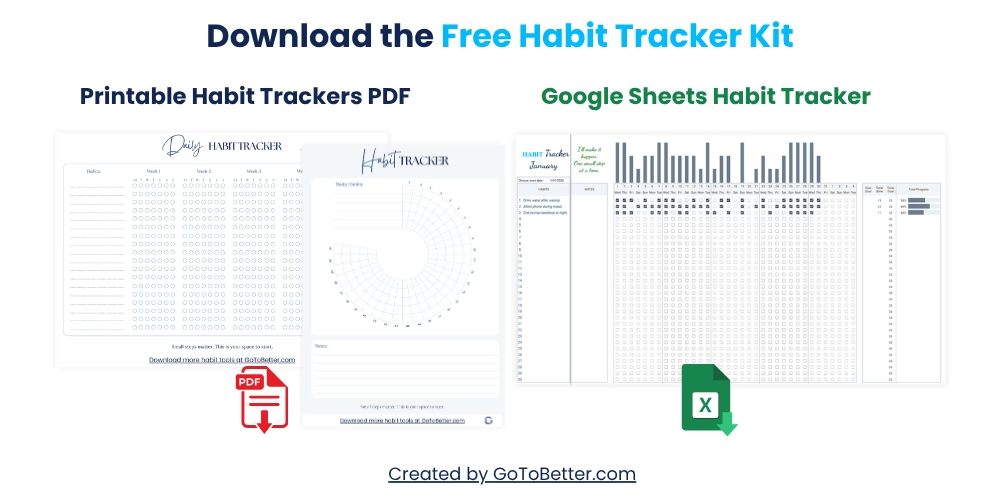
Download our Free Google Sheets Habit Tracker Kit to get started. It includes color-coded formats, motivational versions, and two printable visual habit calendars. No numbers required—just clarity you can feel.
Write your email and get your Free Kit here↓
Why Use a Color Coded Habit Tracker Instead of Numbers?
If numbers made habits stick, nobody would ever quit at week three. The problem is, for most people, numbers are just data points—not motivation. A color coded habit tracker takes the pressure off math and lets your eyes (and your mood) do the work. With the right colors, you can instantly see: “Did I show up? Did I almost? Did I completely miss?” — without the demoralizing effect of a string of zeroes.
Imagine a tracker that greets you with a sweep of green for “present,” a few yellows for “almost,” and an occasional red that feels like a tap on the shoulder—not a failure notice. The feeling is totally different from checking your ‘78%’ streak. Numbers can haunt you; colors can nudge you forward.
GoToBetter says it like this: “Visual progress motivates more than any number. The color of your habits will stick with you longer than a streak ever will.”
The whole point isn’t decoration—it’s feedback. Visual habit trackers (especially in Google Sheets) are designed for clarity, not statistics. The moment you swap numbers for color, you move from pressure to presence. Instead of being judged by the sum, you’re guided by the signal.
GoToBetter InsightStart with three basic colors—one for showing up, one for effort, one for skipped. Colors replace data anxiety with quick, emotional feedback you actually notice.
Many high-achievers swear by data, but honestly, the biggest difference in my own tracker came from color. When I dropped the streak counting and just focused on: “Did I feel present today?”—using green for any version of yes—I stuck to my habits longer than with any metric-based system.
You might notice, the more you track with color, the less you care about “perfect” numbers and the more you focus on what’s actually changing. Over time, those visual cues shape your identity—not just your habits.
If you need proof: studies on visual motivation (see James Clear, BJ Fogg, and color psychology research by Angela Wright) repeatedly show that feedback you can feel—colors, icons, physical tokens—has a measurable impact on habit consistency.
The myth? That tracking by color is “not real data.” In reality, color-coded progress is data you can feel, and that’s what sticks.
How Colors Affect Your Motivation (Real Psychology Insights)
A color coded habit tracker doesn’t just brighten your spreadsheet; it changes your relationship with effort. There’s real science behind it. Color acts as a metaphor for mood—think “green for go,” “yellow for caution,” “red for stop.” Our brains respond to these signals instantly, even before we process what the color means logically.
Angela Wright’s color psychology framework explains how certain colors evoke specific feelings: green signals calm, renewal, progress; yellow triggers energy and attention; red wakes us up and signals a break or alert. When you design your habit tracker around these emotional cues, your brain stops dreading data and starts reading the story of your day.
Some mornings, a single green cell can make you feel like you’re back on track—no matter what yesterday looked like. The opposite is true: a wave of red can nudge you to notice patterns (“Why am I always skipping this on Thursdays?”) without any need for calculation.
You might notice that motivation drops when feedback is only numerical. A study from BJ Fogg’s lab found that people were far more likely to continue a habit when their tracker offered a “visible win” (color, star, or icon) than when they only saw numbers moving. Color is a shortcut to emotion—and emotion drives behavior change.
GoToBetter says it like this: “Color feedback isn’t decoration; it’s an emotional anchor that keeps habits real, even when motivation fades.”
So, if you want a habit tracker that doesn’t feel like a spreadsheet—use color intentionally. It’s not childish or “just for fun.” It’s what your brain actually needs to stay invested, especially when your progress is messy.
GoToBetter InsightTry a green-yellow-red pattern for instant clarity. Use icons or subtle gradients if plain colors start to blend in. The more visceral the feedback, the more you’ll care tomorrow.
In my own trackers, a green cell means “I was there, even if it wasn’t perfect.” I’ll use a yellow for those “almost” days and a red for the ones I missed—no shame, just an honest map. That map feels alive. And that’s what keeps me showing up.
Simple Conditional Formatting Rules for Instant Visual Feedback
You don’t need to be a Google Sheets pro to set up a visual habit tracker. The real goal is fast, emotional feedback—not spreadsheet mastery. Here’s the simplest approach for conditional formatting:
| Habit | Track It? | Why |
|---|---|---|
| Green (✔) | Yes | “I did it”—gives instant positive feedback |
| Yellow (~) | Optional | “Almost”—marks effort, not just success |
| Red (×) | Yes | “Skipped”—signals a pattern without blame |
Set your Google Sheets to fill a cell with green if you write “Y” (for yes, or any symbol you like), yellow for “~” or “almost,” and red for an empty or “N” cell. That’s it. No calculations, no formulas you’ll regret adding later.
Often, the simplest way is the most sustainable. If you want to go further, you can use icons or gradients (more on this below), but never let the tracker become so complex that it adds friction. The only question should be: does this color make me want to keep going?
Many people think you need advanced logic for “real” progress. But here’s the truth: if you look at your tracker and immediately know how you’re doing, you’ve already won.
How to Use Color Coding in Google Sheets for Habits
This step-by-step guide helps you set up color-based feedback in Google Sheets—fast, simple, and emotional. Use this whenever you want to add visual cues to your tracker without extra complexity.
Step 1 – Open Your Tracker
Start with your existing Google Sheets habit tracker, or copy our Free Kit template to get going instantly.
Step 2 – Select Cells to Format
Highlight the habit columns or days you want to color-code. Keep it simple—less is more for clarity.
Step 3 – Add Conditional Formatting
Right-click and choose “Conditional formatting.” Set rules: fill cell green if “Y” or “✔”, yellow for “~”, red for “N” or leave blank. Use icons if you want.
Step 4 – Save and Check Your Feedback
Look at your tracker. Can you tell at a glance how you’re doing? If yes, you’re done. If not, adjust colors or symbols until your progress feels obvious and honest.
Adding Icons and Symbols to Your Habit Tracker
Sometimes, colors aren’t enough—especially if you’re a visual thinker who wants something you can “feel” at a glance. Google Sheets lets you add icons (✔, ×, ★) alongside or instead of colors for deeper feedback.
To do this: simply enter your chosen symbol into the cell for each day (checkmark for done, tilde for “almost,” cross for missed). You can also layer icons with colors by setting conditional formatting for both. For some, a row of checkmarks is far more rewarding than a wall of numbers—because it’s a visible metaphor for momentum.
There’s a reason sticker charts work for kids and adults alike: symbols are emotional short-cuts. They bypass logic and talk directly to motivation.
You might notice, after a week of icons and color, that your mood toward tracking changes. Where you once felt judged by numbers, you now feel nudged by patterns. A row of stars or greens doesn’t shout “perfect”—it just whispers “progress.”
Still, don’t over-complicate it. The key is emotional resonance, not artistic beauty.
Real Examples: Before and After Using Color Coding
Before switching to a color coded habit tracker, I’d catch myself dreading the “numbers” days—those moments when all I saw was a percentage drop or a cold sequence of zeroes. It felt like I was being audited, not encouraged. But after shifting to colors and icons, something changed.
I remember a week when I only hit my “morning stretch” habit twice. My old tracker showed a string of red numbers and my motivation cratered. The new color tracker, though, gave me two bright greens, five soft yellows. Suddenly, I could see effort—not just absence.
That one tweak kept me going into week two. And it’s not just me. Multiple readers have told me the same: “With color, I stopped feeling like I was failing all the time.” Visual habit trackers let you see patterns at a glance—good, bad, or in-between—without the emotional tax of calculation.
The metaphor here is obvious: tracking with color is like switching from black-and-white thinking to a full-color story of your progress.
If you feel skeptical, try this for a week: keep your existing tracker but add a color overlay. After seven days, ask yourself: “Did I feel more motivated by my color progress, or my streak count?” Nine times out of ten, it’s the color.
Common Mistakes: What to Avoid When Using Colors
If you’re switching to a color coded habit tracker, don’t fall for the trap of overthinking it. Many people get lost in the weeds—adding too many colors, making the tracker look like a paint sample card, or worse, trying to assign numeric value to each color. That defeats the whole point. The goal is immediate visual clarity, not a spreadsheet art project.
Another common mistake? Using organizational colors (like blue for work, orange for fitness) instead of motivational ones. Remember: this isn’t about labeling your life; it’s about feeling your progress. Keep colors tied to feedback: green = showed up, yellow = partial effort, red = skipped. More than three colors is usually a sign things are getting overcomplicated.
Some mornings, you’ll be tempted to “improve” the system with formulas and scoring—don’t. If it takes more than five seconds to fill in, you won’t keep up. The real power of a visual habit tracker is the emotional hit, not the technical logic.
Finally, never use color as punishment. A red cell is just a signal, not a judgment. If you find yourself feeling worse after seeing your tracker, consider lightening the color or switching the feedback style. The right color system should help you notice patterns, not drive guilt.
The best way to avoid these mistakes? Keep it simple, honest, and visual. When in doubt, ask: “Does this make me want to track more, or less?”
Frequently Asked Questions on Visual Habit Tracking
Below are answers to the most common questions about setting up and using a color coded habit tracker. If your question isn’t here, you’ll probably find it in our Free Kit instructions.
How do I set conditional formatting rules in Google Sheets for habit tracking?
Select your habit cells, go to Format > Conditional formatting, and set rules: green for “Y” or “✔”, yellow for “~”, red for blank or “N”. Save the rules, and your tracker will color itself as you fill in each day.
Can visual habit tracking replace numeric tracking?
For most people, yes. Visual trackers give instant emotional feedback, which is more motivating than numbers alone. If you want data, you can always add numbers later—but for starting and sticking, colors are usually enough.
What colors work best for motivation in habit tracking?
Stick to colors with strong, intuitive feedback: green (done), yellow (partial), red (missed). Research shows these are universally recognized signals that work across cultures and ages.
How can I use icons in Google Sheets for habits?
Simply type a symbol (✔, ×, ★) in each cell for the day or habit. You can also combine icons with conditional color rules for an even more emotional feedback loop.
Why does color coding help habit formation?
Color acts as an emotional cue, bypassing logical resistance and connecting straight to motivation. It’s immediate, non-judgmental, and helps you feel progress—even if the numbers haven’t caught up yet.
Do I need advanced formulas for a color coded habit tracker?
Absolutely not. The simplest systems—just a few color rules, maybe an icon or two—work best. If you want to add more, keep it for later. Start with clarity, not complexity.
Can I print a color coded tracker?
Yes! Our Free Kit includes printable color habit tracker PDFs and a 30-day visual circle, so you can use them digitally or on paper. Color is powerful whether on-screen or in your journal.
Is color coding “real data” for tracking?
Yes. Visual progress is not just “decoration.” It’s legitimate feedback that keeps you engaged and, for many, it’s more effective than pure numbers.
Can color coding help if I’m overwhelmed or discouraged?
That’s when it helps most. Color feedback shows effort and presence—not just perfection. It lets you see the story of your progress, not just a list of misses.
Where can I get a ready-to-use color coded habit tracker?
Download our Free Google Sheets Habit Tracker Kit (linked above) for a fully built, color-coded tracker plus printables—designed for clarity, motivation, and zero data overwhelm.
GoToBetter Mini Tool: Your Visual Motivation Snapshot
Ready to feel your progress—not just see it? Take one minute to run this check-in and experience the difference visual tracking can make. You don’t need to change your habits—just notice how your tracker feels, right now.
- Open your current habit tracker. If you’re not using one yet, imagine the last seven days of a habit you want to track (e.g., morning walk, reading).
- List the last seven days in a column. For each day, give yourself one of three marks: Green (✔) for “Did it,” Yellow (~) for “Almost,” Red (×) for “Missed.”
- Now, pause and look at your colors. Without counting, how do they make you feel? Motivated, proud, curious, neutral, or pressured?
- Write down one sentence: “When I see these colors, I feel…” Fill in honestly, without judgment.
- Bonus: If the color mix feels stressful or unclear, swap one color (e.g., use blue instead of red) and notice if your feeling changes. Jot down what you notice.
You can repeat this check-in weekly to recalibrate your color codes, or anytime your motivation starts to dip.
Want to Keep Going? Here’s What Helps Next
Color coding isn’t just about tracking—it’s about making your progress feel real, honest, and motivating. Even tiny shifts in color can change how you see your effort and what you choose to do next. The best visual habit trackers aren’t about getting perfect data, but about giving you feedback you can actually use.
This article is part of the bigger picture: GoToBetter’s full Google Sheets Habit Tracker Guide. There, you’ll find more about building a real-life system—one that flexes with your energy, not against it.
If you want a ready-made tool to start right now, grab the Free Google Sheets Habit Tracker Kit (With Bonus Printable PDFs). The kit is built for anyone who’s tired of numbers and wants simple, visual motivation instead:
- Color-coded tracker—track up to 30 habits, instantly visual progress
- Two printable PDFs: daily grid and 30-day circle for paper or digital
- No setup, no apps, just real clarity you can feel in one glance
Start fresh, even if you’re starting over. Enter your email below and download the kit—no extra steps, just a better way to see progress.
Get the Free Google Sheets Habit Tracker Kit:
Color Coded Habit Tracker FAQ
Can I use color coding for more than one habit in my tracker?
Yes, you can color code as many habits as you like in your Google Sheets habit tracker. Simply apply the same three-color system (green/yellow/red or your chosen codes) across multiple rows or columns. If you’re tracking more than five habits, keep your colors consistent to avoid confusion and make the whole sheet instantly scannable.
What if I miss days—do I leave cells blank or use red?
For missed days, either leave the cell blank or use your red indicator—whatever feels more honest and less stressful for you. Some people find that seeing too much red can be discouraging, so blanks may help. Try both and see which keeps you coming back.
Why do I feel more motivated with colors than numbers?
Colors deliver instant emotional feedback—no math required. You see “progress” in a single glance, which is psychologically more rewarding than reading a percentage or count. Over time, your brain associates color patterns with success, effort, or needs for change, making motivation more visceral and less abstract.
Can I change my colors later, or will it ruin my tracker?
Absolutely, you can change your color scheme at any time. Your tracker is a living tool—adjusting colors can make it feel fresh and better fit your current mood or needs. Just update your conditional formatting rules and keep your color meanings clear to avoid confusion.
How do I add icons to my Google Sheets habit tracker?
To add icons, simply type a symbol (such as ✔, ×, or ★) into your daily habit cell. You can also set conditional formatting to change color based on the icon or keep icons and colors together for maximum feedback. This works well for visual learners who need more than just a color cue.
Ready to Go Deeper?
When daily check-ins start to feel grounding—not exhausting—it might be time to build something more complete. That’s where the Ultimate Habit Tracker comes in.
Designed for real-life rhythms (and real-life chaos), it lets you:
- Track multiple habits with clarity
- Reflect without overthinking
- See patterns across sleep, mood, energy, and effort
- Adjust your routines without starting over
You don’t need a perfect system. You just need one clear view—and space to grow inside it.
Or explore all trackers on our shop here—built for real life, not perfection. From quick daily check-ins to full reflection systems, there’s something to fit your flow.
Check out the Ultimate Habit Tracker:
Full details & demo
Or try the Minimalist Tracker if you want the simplest possible visual tracker: See Minimalist Tracker