
+Free Google Sheets Habit Tracker Kit (Printable & Digital Daily Version)
Weekly habit tracker Google Sheets: For anyone burned out by daily check-ins, this is your calm, visual guide to weekly (or monthly) tracking—plus a free daily kit to help you start simple, then adapt to your own pace.
By GoToBetter | For people whose lives don’t fit a template
Weekly Habit Tracker Google Sheets: Track Your Habits—On Your Terms
A weekly habit tracker in Google Sheets helps you step back from daily pressure and see real patterns over time. Instead of chasing streaks, you track habits in weekly or monthly blocks—whatever gives you more breathing room.
The classic setup: days in rows, habits in columns, with a simple check or count for each week. Or, switch to a month-at-a-glance for a bigger-picture view. The real trick? **Track in a way that matches your life—not someone else’s system.**
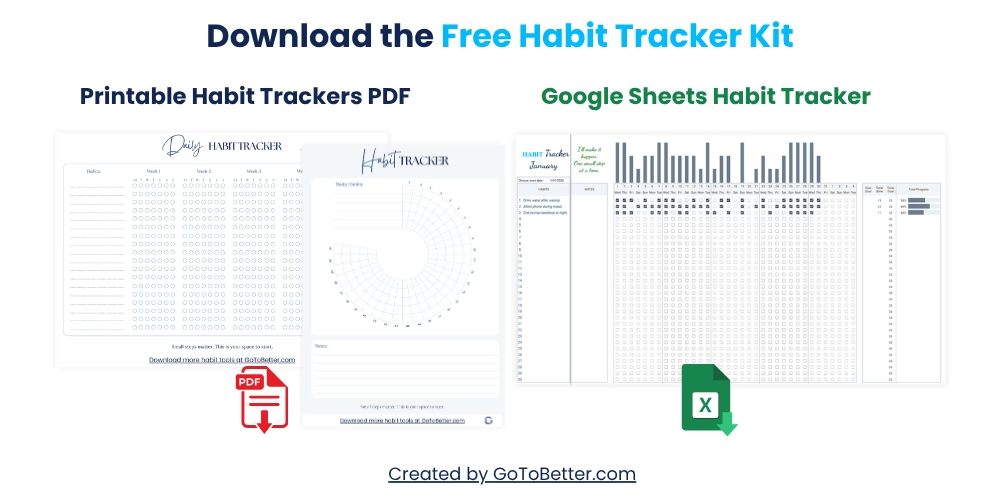
If you’re not ready to build from scratch, start with the Free Google Sheets Habit Tracker Kit—an easy daily version you can use right away. Inside: a simple digital sheet and printable daily trackers (grid and circle). Once you’re comfortable, you can easily adapt these layouts to track weekly or monthly—this article shows you exactly how.
- Minimalist daily tracker for Google Sheets—copy, edit, and use instantly
- Printable daily sheets: classic grid & visual circle
- All layouts are easy to tweak for weekly/monthly rhythm
Write your email and get your Free Kit here↓
Why Switch From Daily to Weekly or Monthly Habit Tracking?
Sometimes, daily check-ins just don’t fit real life. Work shifts stretch late. Kids get sick. Your routine changes season to season. A weekly habit tracker in Google Sheets gives you permission to adjust without losing track of what matters.
Think about those weeks where you actually do your habit four times, but never at the same hour—or you catch up in bursts, not perfect rows. With a weekly or monthly setup, you still see the pattern. The big win? More breathing room.
It’s common to feel guilty if you don’t fill every day in a tracker. But what actually moves you forward isn’t the perfect streak—it’s noticing, over time, which habits keep showing up even when life is busy.
One GoToBetter reader, a freelancer, shared: “Switching to a weekly view let me actually see my progress, even if my days were messy. I stopped feeling behind.”
GoToBetter says it like this: “Not every habit asks for your attention every day. Sometimes, seeing progress by the week is what keeps you going.”
If you’ve ever abandoned a tracker because “life happened,” you’re not alone. This isn’t failure. It’s a signal: maybe a wider view will give you the calm and clarity you need. That’s why so many shift to a weekly habit tracker in Google Sheets—and find it’s not only easier, but more sustainable over time.
Reflection: Think about your last month. What habits did you actually practice—even if not daily? What would happen if you tracked those weekly instead?
GoToBetter InsightSwitching to a weekly or monthly format doesn’t mean you’re lowering the bar. It means you’re finally matching your tracker to your life—not someone else’s rulebook.
That’s the real upgrade: freedom, not pressure.
The Best Layouts for Weekly and Monthly Tracking in Google Sheets
The simplest weekly habit tracker in Google Sheets looks like this: each row is a day of the week, each column a habit. Fill in your checkmarks, tallies, or color codes as you go. At week’s end, glance at the whole row—did you move forward overall? No need to stress about blanks.
Want a monthly overview? Make a new tab for each month. Write habits down the left, dates across the top, then just note “done” or “not done” for each. Some people like to use color coding—green for completed, yellow for “sort of,” red for “skipped.” Others keep it all in black and white for a calmer look.
You can also make use of simple formulas in Google Sheets to add up your weekly totals, spot patterns, or visualize streaks without complexity.
| Layout | Best For | Why It Works |
|---|---|---|
| Weekly (Days as Rows) | Shifting schedules | See patterns, not perfection; easy to spot trends. |
| Monthly (Dates as Columns) | Big-picture tracking | One glance = whole month. Good for “sometimes” habits. |
| Printable (Weekly Sheet) | Paper lovers, off-screen days | Just circle or cross off—low friction, high visibility. |
| Simple Grid with Totals | Progress focus | Let totals motivate you, not streaks. |
One parent described taping a weekly habit tracker from Google Sheets to their fridge: “Everyone could see it. Nobody judged blank spaces—only the wins.” For them, the sheet was a quiet reminder, not a scoreboard.
GoToBetter says it like this: “A habit tracker works best when it’s visible—and forgiving.”
If you’re visual, try highlighting just the habits that matter most this season. If you want flexibility, rotate which habits appear each week. That’s the beauty of Google Sheets: you can adapt your weekly habit tracker as life changes.
GoToBetter InsightStart with a basic weekly or monthly grid, then personalize as you learn what motivates you. Adjusting is a feature, not a flaw.
Reflection: What layout would make it easy for you to *see* your week—without feeling watched or graded? Which habits belong on your tracker right now, and which could wait for next month?
Try This Layout: Weekly and Monthly Habit Tracker Examples
Before you start building your own, here are two simple visual layouts you can copy or adapt in Google Sheets. They show exactly how weekly and monthly habit tracking can look—without needing any templates or tools.
These are just examples. Feel free to rename the habits, change the days, or simplify even more. The best layout is the one that makes your habits visible—without pressure.
Weekly Tracker: Days as Rows, Habits as Columns
This layout works well if your week feels unpredictable or you want to reflect once at the end of each week.
| Day | Stretch | Read | Drink Water |
|---|---|---|---|
| Monday | ✔ | ✔ | ✔ |
| Tuesday | ✘ | ✔ | ✔ |
| Wednesday | ✔ | ✘ | ✔ |
| Thursday | ✔ | ✔ | ✘ |
| Friday | ✔ | ✔ | ✔ |
| Saturday | ✘ | ✘ | ✔ |
| Sunday | ✔ | ✔ | ✔ |
Monthly Tracker: Habits as Rows, Days as Columns
This layout is great if you want a big-picture view. It helps you see which habits show up over the month—without focusing on streaks.
| Habit | 1 | 2 | 3 | 4 | 5 | 6 | 7 |
|---|---|---|---|---|---|---|---|
| Meditate | ✔ | ✔ | ✘ | ✔ | ✘ | ✔ | ✔ |
| Journal | ✘ | ✘ | ✔ | ✔ | ✔ | ✘ | ✔ |
| Steps Walked | ✔ | ✔ | ✔ | ✘ | ✔ | ✔ | ✔ |
These layouts aren’t about getting every box filled. They’re about helping you *see* the rhythm of your habits over time—and adjust gently as needed.
How to Use a Weekly or Monthly Tracker Without Pressure
The shift to a weekly habit tracker in Google Sheets isn’t just about the format—it’s about how you treat yourself along the way. The goal isn’t to fill every box, but to learn from what actually happens.
Imagine your tracker as a window, not a judge. Use it to notice trends: maybe your energy dips midweek, or you always rebound on Sundays. Maybe some habits fade, and new ones take their place. That’s normal.
A student once told us, “Switching to weekly helped me see progress I missed when I was focused on each day. I realized I actually was improving—even with ups and downs.”
A gentle ritual can help: at the end of each week, spend two minutes glancing at your tracker. Ask yourself—What worked? What felt like a slog? Do you want to keep, drop, or adjust any habits next week?
Reflection: At the end of this week, look for one small win. What’s different from last week, even if it’s just a single box filled?
A weekly habit tracker in Google Sheets can be a “rearview mirror,” showing you patterns you might not notice in the rush of daily life. Over a month, you may spot wins you’d have otherwise missed.
One metaphor that helps: think of your tracker as a garden. Not every plant grows at the same pace, but with a wider view, you see the whole landscape—not just one wilted leaf.
That’s why the pressure drops. A weekly or monthly habit tracker lets you step back, breathe, and see the real growth that was there all along.
Digital vs. Printable: Which Format Fits Your Life?
Some thrive with a digital weekly habit tracker in Google Sheets—easy to access on your phone, quick to edit, always backed up. Others want the feel of pen and paper, taping a printed weekly or monthly grid where they’ll see it every morning.
Neither is “right.” The best format is the one you’ll actually use. Many start with digital (for easy edits), then print a sheet for their desk, fridge, or planner. Google Sheets makes it simple to print any layout.
Take Anna, a teacher. She tracks habits like “plan lessons” and “walk after work” in Google Sheets on her laptop, but on busy weeks, she prints a simple grid and fills it in by hand—no pressure if some boxes stay empty.
The monthly tracker template in Sheets is especially handy for big-picture goals—think “meditate 15 times this month” or “exercise 10 days out of 30.” A single sheet is often enough.
If you ever lose steam with one format, try the other. The point isn’t to be perfect—it’s to keep the tracker visible and alive in your routine.
Reflection: Which would feel easier right now: a sheet on your phone, or a piece of paper on your kitchen table? Which do you notice more often?
Whether you use a weekly habit tracker in Google Sheets or a printed grid, the real value is having a gentle reminder—not a strict scoreboard—of your progress. That’s what keeps habits moving forward, even when life pulls you in a dozen directions.
How to Switch From Daily to Weekly or Monthly Tracking in Google Sheets
How to Switch From Daily to Weekly or Monthly Tracking in Google Sheets
This step-by-step guide helps you adjust your tracker layout so it matches your new rhythm—no templates or complex edits required.
Step 1 – Make a Copy of Your Current Tracker
Open your existing Google Sheets tracker and create a copy. This keeps your old data safe and lets you experiment freely.
Step 2 – Choose Your Time Window
Decide if you want to track habits by the week or by the month. Rename your sheet (e.g., “July Habits” or “Week 27”).
Step 3 – Adjust Rows and Columns
For weekly: Label rows as days (Monday–Sunday), columns as habits. For monthly: Label rows as habits, columns as dates (1–30/31).
Step 4 – Add Simple Totals or Color Coding
Use built-in SUM functions or conditional formatting to see totals at a glance. Keep it minimal—only track what helps.
Step 5 – Print If You Want Offline
Use Google Sheets’ print feature to create a clean, printable weekly or monthly grid. Keep it visible—on your fridge, desk, or planner.
It’s as simple as that. Remember: switching to a weekly habit tracker in Google Sheets is a move toward clarity, not complexity.
GoToBetter Mini Tool: Find Your Tracking Rhythm
Not sure if daily, weekly, or monthly tracking fits your habits best? Take 2 minutes for this simple, pressure-free check:
- Look at your current tracker (or imagine your routine for the past week).
- Ask yourself:
- Did I skip tracking most days—or did I check in often?
- When I missed tracking, did it feel like stress or relief?
- Which habits actually need daily attention? Which would be fine with a weekly glance?
- Now, try this thought experiment: If you could only check your tracker once a week, what would you focus on? What would change?
- Write down your answers. Does the idea of a weekly habit tracker in Google Sheets feel like breathing room—or does it make you want more structure?
- Decide: For the next 7 days, will you track daily, weekly, or just reflect at the end of the week? Set a reminder and test it—then adjust as needed.
There’s no wrong answer. The right tracking rhythm is the one that fits *your* life this month—not last month, not someone else’s.
Want to Keep Going? Here’s What Helps
You’ve just learned how switching to a weekly habit tracker in Google Sheets can make habit-building more realistic—especially when daily check-ins start to feel like too much.
This article is part of a bigger resource built for real-life change, not perfect streaks:
Read The Ultimate Guide to Google Sheets Habit Tracker — it covers digital and printable layouts, easy setup, and all the honest strategies that make habits stick (even when you’re not tracking every day).
Want something ready-to-go? Grab your Free Google Sheets Habit Tracker Kit — designed for busy, real people. You’ll get:
- Instant Google Sheets habit tracker (simple daily layout)
- Printable daily trackers — grid and circle options
- No setup, no apps, just easy start and gentle progress
Try it now: enter your email and download your free kit.
Whether you use it every day or just once a week, this kit helps you build habits your way.
Weekly Habit Tracker Google Sheets: FAQ
How do I set up a weekly habit tracker in Google Sheets?
Create a simple table with the days of the week in rows and your habits in columns. Mark off each day you complete a habit, or add a weekly total. Google Sheets makes it easy to adjust layouts, add formulas, or print your tracker if you prefer paper.
When should I switch from daily to weekly tracking?
Switch when daily check-ins start to feel like pressure instead of support. If you notice you’re missing days or dreading your tracker, try weekly or monthly. Many people find this format reduces stress and keeps habits visible without overwhelm.
Can weekly tracking still help me build habits?
Yes, weekly tracking can absolutely support habit-building—especially if you have a busy or unpredictable schedule. It allows you to see progress over time, notice patterns, and adjust without the guilt of missed days.
What’s the best format: digital or printable?
The best format is the one you’ll actually use. Google Sheets is great for easy editing, sharing, and tracking on the go. Printed versions are handy for visual reminders on your desk or fridge. Try both and see which keeps you more consistent.
Do I need advanced formulas or templates to use a weekly habit tracker?
No, you don’t need anything fancy to start. A basic table is enough for most people. As you go, you can add simple totals or color coding, but the real power comes from regular check-ins—not from complexity.
Ready to Go Deeper?
When tracking starts to feel natural and you’re ready to level up, the Ultimate Habit Tracker is there. It’s a customizable Google Sheets tool designed for real life — track daily, weekly, or monthly, visualize your progress, and reflect as you go.
- Simplify routines and stay organized with a single, clear view
- Automated updates and dynamic visuals keep you motivated
- Privacy-first: lives in your own Google account, always in your control
- Includes weekly reviews and reflection space — so you actually see what’s changing
Or check out the Minimalist Tracker for a quick, easy start. Explore all GoToBetter trackers in our shop for tools that match your habits—not the other way around.
See the Ultimate Habit Tracker
Try the Minimalist Tracker
See all habit trackers in the GoToBetter shop
The best system is the one that works in real life—and makes room for real change.