
+Free Google Sheets Habit Tracker (printable & editable)
Track multiple habits in Google Sheets without complexity—whether you’re new to tracking or tired of messy layouts. Includes: minimalist weekly templates, practical dropdown advice, and clear before-and-after examples.
By GoToBetter | Tested by real life, not just theory
Track Multiple Habits in Google Sheets—Without the Mess
If you’ve ever tried tracking multiple habits, you know things get messy fast. More habits usually mean more columns, confusion, and frustration. But let’s be clear: tracking multiple habits doesn’t require complexity—it requires clarity.
This article is not about using fancy colors to motivate yourself. It’s purely about structure—setting clear weekly headers, defining logical columns, and using dropdowns lightly and practically. Think of colors here as simple labels, helping you quickly distinguish between habits—not as feedback or motivation.
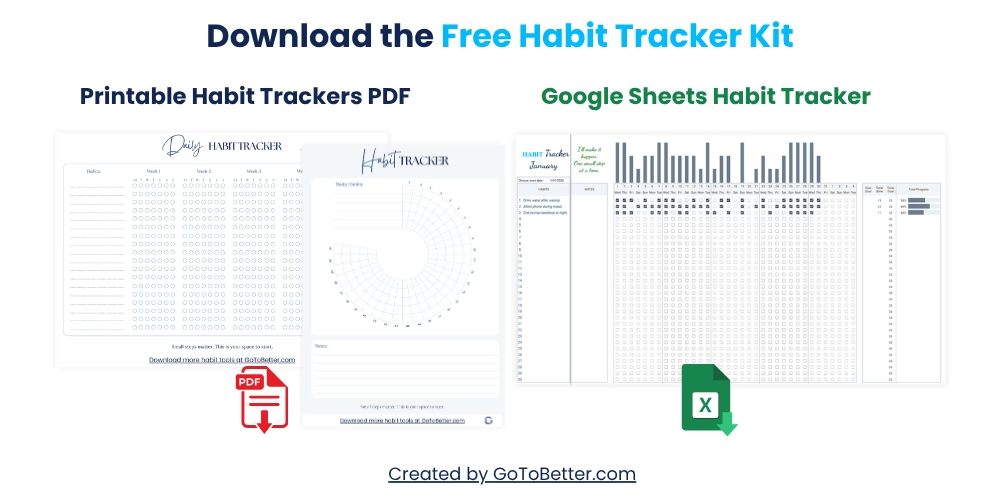
Before you start, grab our Free Google Sheets Habit Tracker Kit. It’s designed exactly for clarity and ease—track up to 30 habits neatly and clearly, without setup or overwhelm. Plus, two minimalist printables to keep things extra clear and organized.
Write your email and get your Free Kit here↓
Mistakes to Avoid When Tracking Multiple Habits
Trying to track 12 habits at once? Using a sheet with daily columns that scroll for days? Or turning your tracker into a rainbow-coded vision board? These common mistakes sabotage consistency before habits even begin to stick.
Here’s what to avoid if you want your multi-habit tracker to actually work—especially if you want it to still function three months from now.
- Tracking too many habits: More than five, and the whole thing collapses. Stick to 3–5 habits max. The rest can wait.
- Daily layout overload: It feels detailed—but it’s overwhelming. A weekly layout gives enough context without visual chaos.
- Over-customization: Too many icons, emojis, or formula tricks and you won’t open the sheet at all. Clean > clever.
One user told us they “just needed a system to track water, meditation, and walking.” What they built instead? A 12-tab sheet with habit ratings, reflections, color rules, and reward counters. Guess what happened? They abandoned it in five days.
Don’t design your sheet like a productivity app demo. Design it like something your tired, rushed future self can glance at on a Thursday and still understand.
GoToBetter says it like this: “The point of tracking isn’t discipline. It’s identity. You’re not tracking what you do — you’re tracking who you’re becoming.”
Real-Life Example: Before and After Layout
You might notice that the moment you try to “optimize” your Google Sheet for aesthetics, you stop using it. That’s not a coincidence.
Here’s a simplified contrast between a chaotic, overbuilt sheet and a minimalist one that actually gets used. This is loosely based on what one user shared with us after rebuilding their setup from scratch:
| Layout Type | Description | Problem/Solution |
|---|---|---|
| ❌ Before (Chaotic) | Daily columns, 9+ habits, color blocks everywhere, multiple sheets | Overwhelming, hard to scan, abandoned after 1 week |
| ✅ After (Minimalist) | 1 weekly sheet, 3 habits, dropdown status, soft grey labels | Easy to maintain, fast to review, used consistently for 6+ months |
The difference wasn’t in motivation. It was in layout logic. The second version didn’t feel like another task. It felt like a quick check-in.
GoToBetter InsightUse a weekly sheet with habits vertically and days across the top. Add dropdowns to reduce typing and mental friction.
When Less is More: Why Minimalism Wins in Habit Tracking
A habit tracker isn’t supposed to impress anyone — not even you. It’s supposed to support the version of you that’s half-awake, short on time, and juggling too many things already.
Minimalist layouts reduce friction. They make it easier to open the sheet again tomorrow. That’s the real success metric: Did you come back?
Here’s what happens when you simplify:
- Fewer decisions: You don’t waste time figuring out which tab to click or which icon to use.
- Fewer distractions: No temptation to adjust fonts, add quotes, or create progress graphs instead of actually tracking.
- More continuity: When it’s boring and usable, it’s repeatable. And that’s what builds long-term change.
Think of it like a kitchen. A clean countertop makes you want to cook. A cluttered one makes you want to order takeout. The same applies to tracking layouts.
GoToBetter says it like this: “A tracker doesn’t need to feel inspiring. It needs to feel obvious.”
Simple Dropdowns and Filters to Streamline Habit Tracking
One of the best features in Google Sheets is also one of the most underused: dropdowns. They turn your habit updates into 1-click actions. No typing. No typos. No extra mental load.
Set up each cell to offer a few clear options:
- ✅ Done
- ⏸ Skipped
- Not needed
Pair that with conditional formatting to gently color the background — not the text — and your tracker becomes readable at a glance. Filters help you quickly see which habits fell off or which weeks need review, without building pivot tables or dashboards.
GoToBetter InsightTry dropdowns instead of manual entry — it’s faster, neater, and lowers resistance to daily use.
Just remember: dropdowns are there to remove friction, not to create complex status codes. Three simple states is enough.
How to Set Up a Weekly Habit Tracker in Google Sheets
This step-by-step guide will help you build a minimalist tracker that works long term — no clutter, no overwhelm.
Step 1 – Choose Your 3 to 5 Habits
Decide which habits you want to track this month. Avoid aspirational overload — focus on real, doable actions.
Step 2 – Create Your Weekly Layout
In row 1, label the columns: Mon, Tue, Wed… Sun. In column A, list your 3–5 habits vertically starting in row 2.
Step 3 – Add Dropdowns for Status
Select the cells under each day and insert a dropdown list with 3 values: Done, Skipped, Not Needed.
Step 4 – Apply Subtle Formatting
Use conditional formatting to lightly shade cells: green for Done, grey for Skipped. Avoid heavy color fills or text styles.
Step 5 – Duplicate for Each Week
Duplicate your tab for each new week or copy the whole layout down the page. Add a column on the side for reflections if needed.
GoToBetter Mini Tool: The 1-Minute Habit Layout Scan
Not sure if your current habit sheet is clear enough to last? Run this 1-minute scan before you add another habit or tweak your layout:
- Open your current Google Sheets habit tracker (or picture it in your mind).
- Set a timer for 60 seconds. Without scrolling, try to answer these questions:
- How many habits are you tracking right now?
- Can you see your whole week at a glance—no scrolling or switching tabs?
- Is every column, dropdown, or color still relevant? (If not, note what can be removed.)
- Could someone else understand your layout in 30 seconds?
- For every “no” you answered, cross out one thing from your sheet (extra habit, extra color, or unused column).
- Repeat once a month—less is always more.
This scan works best when you’re tired, in a rush, or have just skipped a few days. If the sheet feels heavy, it’s not your willpower—it’s the layout.
Want to Keep Going? Here’s What Helps
Tracking multiple habits doesn’t have to be a test of willpower. When your layout is clear, the act of showing up gets easier every week—no matter how chaotic life feels outside the spreadsheet.
This article is part of the GoToBetter Google Sheets Habit Tracker Guide — a practical system for real-life habits, built for clarity, not perfection.
If you’re curious about how to get started (or start over) with a system you’ll actually use, grab the Free Google Sheets Habit Tracker Kit (With Bonus Printable PDFs). It includes a ready-to-copy digital tracker, two minimalist printables, and a setup that lets you see your entire week at a glance. No app, no login—just download and start with the tools you actually need.
- Google Sheets habit tracker (track up to 30 habits, automated progress bars, fully editable)
- Minimalist printable PDF habit grids (classic + 30-day circle)
Ready to simplify your routines? Enter your email to download your free kit and make habit tracking one less thing to overthink.
Track Multiple Habits in Google Sheets FAQ
How many habits can I realistically track in one Google Sheet?
The optimal number is 3–5 habits per sheet for most people. Any more, and your tracker becomes visually crowded and harder to use—most users abandon sheets with 6+ tracked habits. If you truly need to track more, group similar habits together or use a separate sheet for each life area.
What’s the best Google Sheets layout for tracking several habits?
The best approach is a weekly layout: habits down the left, days of the week across the top. This lets you see patterns, check progress at a glance, and avoid daily micromanagement. A clean weekly grid is easier to maintain and far less stressful than tracking every habit every day.
Should I use dropdowns or checkboxes for updating habit status?
Dropdowns are ideal for tracking multiple habits in one Google Sheet. You can customize status options like “Done,” “Skipped,” or “Not Needed,” which reduces manual typing and makes visual scanning easier. If you only track yes/no habits, checkboxes are fine—just keep the visual format simple.
Can I track my habits in Google Sheets from my phone?
Yes, a well-designed Google Sheets habit tracker works on both desktop and mobile. Minimal layouts with dropdowns or checkboxes are especially phone-friendly—no horizontal scrolling or tiny buttons. For the best results, test your sheet on mobile and adjust column widths if needed.
What if I miss days or forget to update my tracker?
Missing days is normal, and it doesn’t mean your system failed. A weekly layout helps you catch up or note skipped days without losing your overall progress. Just mark missed days as “Skipped” or leave them blank, and refocus on consistency, not perfection.
Ready to Go Deeper?
When tracking habits in Google Sheets starts to feel easy—not like another job—it might be time to go further. That’s where the Ultimate Habit Tracker comes in.
Built for real-life chaos and long-term growth, it lets you:
- Track multiple habits, daily, weekly, or monthly — with clarity and zero clutter
- Visualize your progress instantly with automated updates
- Reflect on what matters without overthinking
- Stay organized on any device, anytime — everything in your Google account, fully private
Want even more flexibility or prefer a radically simple setup? Check out the Minimalist Habit Tracker — for those who want the least resistance, cleanest layout, and fastest results.
Or explore all available trackers and tools on our GoToBetter Shop — everything is designed for clarity, ease, and actual daily use.