
+Free Google Sheets Tracker Kit & Printable PDFs
Google Sheets vs Notion habit tracker: whether you’re burned out on apps or just want the simplest system that works, this guide is for you. Includes: side-by-side pros and cons, hands-on examples, real user moments, and a free tracker kit.
By GoToBetter | Built by real habit-changers, not productivity hype
Google Sheets vs Notion Habit Tracker: What Actually Matters?
If you’ve ever stared at a blank Notion page thinking, “Shouldn’t this be easier?”—or wondered why Google Sheets just gets the job done—this is for you.
Both Google Sheets and Notion can track habits. But the experience is nothing alike.
GoToBetter says it like this: “The best habit tracker is the one you actually open on a bad day.”
| Tool | Best For | Setup Speed | Customization | Burnout Risk |
|---|---|---|---|---|
| Google Sheets | Overwhelmed, ADHD, beginners | ⚡ Under 2 minutes | Basic (edit columns, simple formulas) | Very Low |
| Notion | Tinkerers, visual thinkers, dashboard fans | ⏳ 30+ minutes | Extreme (full dashboards, formulas, automations) | Medium–High |
Notion gives you infinite options—and, sometimes, infinite decisions. Google Sheets? It just lets you tick the box and move on.
Here’s the honest truth: Notion is gorgeous, but Sheets is ready right now. No endless tinkering, no waiting for inspiration.
Most people won’t tell you this. But as someone who’s tried both, I can say: On hard days, simplicity wins.
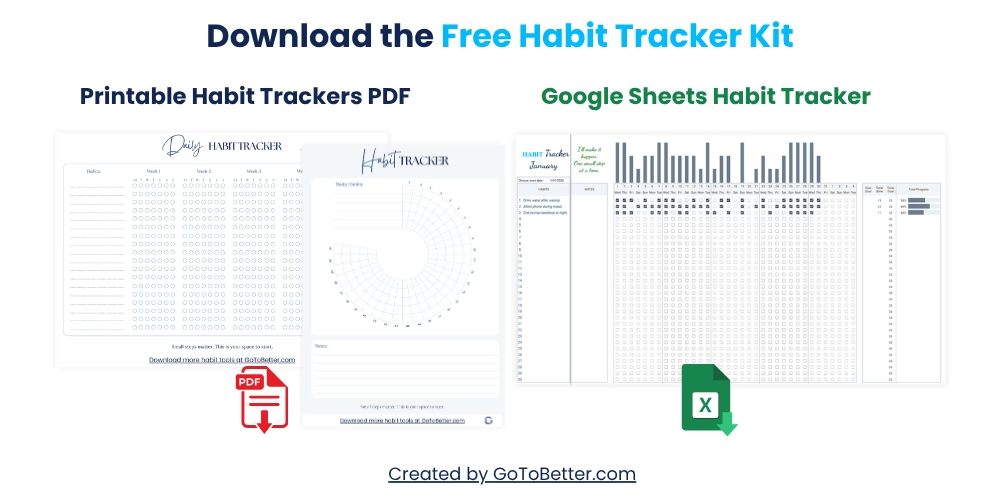
Before you dig in, make it easy on yourself. Start with the Free Google Sheets Habit Tracker Kit—a bundle designed for real life.
Here’s what you get:
- A no-setup Google Sheets tracker—just copy and start tracking up to 30 habits, with visual bars and mobile-friendly design.
- Two printable PDF trackers—a minimalist daily grid and a 30-day habit circle—for your fridge, desk, or journal. Print or fill digitally, your choice.
You don’t need to “choose” a side right now. Try both. See what sticks.
Write your email and get your Free Kit here↓
Simplicity & Setup: Which Tool Gets You Started Faster?
Let’s start where most people get stuck: actually beginning.
If you want a habit tracker for beginners—or you just want something that works without drama—the difference in setup between Google Sheets and Notion isn’t minor. It’s the entire point.
With Notion, you’re staring at a blank canvas. There’s beauty in that, sure. You can build, decorate, add icons, and connect databases. The problem? It’s easy to spend more time designing than tracking.
Google Sheets doesn’t ask for creativity. It just asks, “What do you want to track?” Type your habits in, and you’re tracking. The best Google Sheets habit tracker template? It’s usually a copy-paste away, not a project.
Some mornings, it feels like a choice between art and action. Do you want a system you can show off, or one that gets out of your way when you’re tired?
GoToBetter says it like this: “The best habit tracker is the one you actually open on a bad day.”
You might notice that on “messy” days—travel, sick kids, mental fatigue—Google Sheets lets you check a box in under ten seconds. Notion often needs more from you: opening the right page, waiting for it to load, navigating a dashboard, clicking through blocks. This friction is invisible when you’re motivated, but on hard days, it can be the end of your streak.
GoToBetter InsightStart with a system you can actually maintain on your busiest, most distracted days. Friction is the enemy of new habits, not lack of motivation.
James Clear (author of Atomic Habits) says, “You do not rise to the level of your goals. You fall to the level of your systems.” If your system is heavy or slow, you’ll skip it.
So if setup time matters—if you want a customizable habit tracker that starts today, not “once I finish designing”—Google Sheets is the shortcut. If you love the blank canvas, and you want to build a perfect dashboard, Notion will reward your patience. Just know what you’re getting into.
| Tool | Time to First Habit | Friction Level | Setup Required |
|---|---|---|---|
| Google Sheets | 2 minutes (copy template) | Very Low | None—just type your habits |
| Notion | 30+ minutes (choose/build template) | High for beginners | Design dashboard, set up views, add icons |
This is the heart of the habit tracking comparison: how fast can you get from “I want to track” to “I actually tracked”?
Reflection: What does “easy setup” mean to you—speed, or creative control?
Personalization vs Control: How Much Do You Really Need?
Most people love the idea of full customization. In Notion, you can design anything—dashboards, progress bars, gamified streaks, color codes, reminders, widgets. It’s like a craft store for productivity fans.
But here’s where the habit tracking comparison gets honest: too much personalization can become a trap.
Every decision—layout, columns, properties, colors—creates more friction. “I’ll track once I tweak this view.” “Maybe tomorrow, after I fix my streak formula.” Notion habit tracking problems start when your tool becomes the hobby, not the habit.
Google Sheets offers customization, but it’s straightforward. Add or remove a column, update a habit, sort by date. You’re in control, but you can’t get lost in the options.
I used to think I wanted infinite flexibility. Now, I just want to check off a day and get a visual bar showing progress. That’s enough.
GoToBetter says it like this: “Simplicity beats aesthetics when you’re building real habits.”
Many beginners—and a lot of overwhelmed users—feel safer with a tracker that doesn’t tempt them to “optimize” every detail. Sheets is easy habit tracker tools without distractions. Notion’s depth is powerful, but you have to protect your focus.
GoToBetter InsightMost people do more in a basic system than in a perfect one. Choose the tool that makes tracking automatic, not endless.
You can compare Notion and Google Sheets for habits all day, but the bottom line: if you get lost in details, choose simplicity. If you love to tinker—and that brings you joy—Notion will let you play.
Ask yourself: “Do I want a customizable habit tracker, or do I want to actually see my progress?”
Visual Progress & Motivation: What Helps You Keep Going?
Visual progress habit tracking isn’t just about pretty charts. It’s about seeing, at a glance, “I’m doing the thing I said I would do.” That dopamine hit matters.
Notion lets you build dashboards with streaks, graphs, and even pop-up confetti when you hit a milestone (if you have time to set it up). But in practice, a lot of users end up with a wall of checkboxes, or worse—an unfinished dashboard they never use.
Google Sheets may look basic, but automated formulas and progress bars are built into the best templates. You tick a box, and the percentage goes up. It’s not beautiful, but it’s instant feedback.
For me, the metaphor is simple: Notion is like a vision board—gorgeous, motivating, but sometimes overwhelming. Google Sheets is like a post-it on your fridge—always in sight, always honest.
Some users need visual motivation. Others just need the minimum: did I show up or not? Both can work. But if you find yourself falling off the wagon because you don’t see progress—or because your dashboard isn’t finished—pay attention.
| Tool | Visual Feedback | Effort to Set Up | Review Experience |
|---|---|---|---|
| Google Sheets | Progress bars, auto-updating | Low (template does the work) | One-page, fast review |
| Notion | Custom dashboards, streaks | Medium-High (manual build) | Dashboard view, but can get complex |
You might notice that people who track habits without apps—using pen and paper, or a printed PDF—care more about seeing a pattern than about digital features. If that’s you, both Sheets and Notion can deliver. The question is, which one does it faster and more reliably?
Reflection: What motivates you to keep tracking—numbers, streaks, visual bars, or just the satisfaction of marking a day?
Who Should Use Which? Real-Life Scenarios
Notion habit tracker pros and cons often come down to personality. Some users thrive with options, others sink under the weight of choice.
You might see yourself here:
- Overwhelmed beginner: Spent an hour browsing habit tracking comparison guides, still not tracking. Google Sheets gets you started in one click.
- Perfectionist: Built a gorgeous Notion dashboard, but never actually used it. Switched to Sheets—started tracking every day.
- Busy parent: Needs something fast, mobile-friendly, no learning curve. Google Sheets is always ready—printable options for when screens are too much.
- Visual learner: Loves seeing colorful streaks and graphs—enjoys tinkering in Notion, but sometimes loses momentum.
- ADHD or easily distracted: Notion feels like a playground (too many tabs, too many ideas). Sheets is “boring”—which is good.
You can see the pattern: the more friction, the more likely you’ll drop off.
I used to spend Sunday evenings trying to “improve” my Notion dashboard. I’d add new columns, automate new formulas, decorate my progress tracker. It felt productive, but my habits? Barely tracked. The month I switched to Google Sheets, I checked off more days than in the last three months combined.
This isn’t about choosing the “best” tool. It’s about choosing the one you’ll use when motivation is gone.
So ask yourself: what has actually worked for you before? What’s getting in your way now? Are you tracking—or are you building a tracker?
Common Myths About Google Sheets & Notion Habit Trackers
There’s a lot of noise in the productivity world. Let’s clear it up.
-
Myth #1: “Notion is always better because it looks nice.”
Reality: If design motivated habits, we’d all be perfect. What matters is what you do, not how your dashboard looks. -
Myth #2: “Google Sheets is too basic for real habit tracking.”
Reality: Simple works. You can track as many habits as you want, with clear progress bars—no distractions. -
Myth #3: “Switching from Notion to Sheets means you failed.”
Reality: Changing your system is not giving up. It’s choosing what actually fits your life now. -
Myth #4: “Templates solve everything.”
Reality: A template can help you start—but the tool still needs to match your energy, not drain it.
People often think they “should” love a certain tool because everyone online seems to. But the quiet truth is, real progress needs less perfection—and more visibility.
If you want a habit tracker for beginners, focus on what feels easy, not what looks impressive.
You don’t need the “best” tool—you need the one that works for your brain on your busiest day.
Bottom Line: How to Choose What Works for You
It’s tempting to keep searching for the “perfect” system. But the real win is getting started—and actually sticking with it.
If you find yourself spending more time planning your tracker than tracking your habits, pause. Switch to the simplest tool you can live with.
There’s no medal for using the fanciest platform. The point is to see your progress, feel in control, and make tracking as automatic as brushing your teeth.
If you love to build and tweak, Notion will give you room to play. If you want focus, speed, and clarity, Google Sheets (or even a printable PDF) is unbeatable.
Remember: Switching from Notion to Google Sheets isn’t giving up—it’s getting real. No shame in that.
Metaphor: Trying to find the “right” tracker is like shopping for running shoes—you can read a hundred reviews, but what matters is how it feels the moment you walk out the door.
So—what matters to you: control, simplicity, or creative freedom? Try both, if you’re unsure. The best answer is the one you use next week, not the one you save for “someday.”
GoToBetter Mini Tool: 1-Minute Tracker Gut Check
Not sure which tool fits you right now? Try this gut-check exercise before you overthink it. Grab a sticky note or just use your phone. Don’t edit—just answer quickly:
- Write down which tracker (Sheets or Notion) you actually feel like opening today—not which one you “should” use.
- List the top 2 things that frustrate you most about tracking habits right now. (E.g., “I get lost in setup” or “I never see my streak.”)
- Now, circle the option you’d be willing to start using this week, even on a bad day.
The tool you’re most likely to open on your lowest-energy day is the one that will actually work for you. No need to justify it—your gut already knows.
Want a System That Actually Lasts?
You’ve seen the honest pros, cons, and real-life realities of Google Sheets vs Notion for habit tracking. No tool will do the work for you—but the right one can make it easier to show up, even when you’re tired.
This article is part of the full GoToBetter Guide to Google Sheets Habit Trackers—your no-fluff, practical roadmap to building a system that fits real life, not just the highlight reel.
If you want a jump start, grab the Free Google Sheets Habit Tracker Kit. You’ll get:
- Google Sheets tracker for up to 30 habits (no setup—just copy and go)
- Two printable habit tracker PDFs (minimalist daily grid & visual 30-day circle)
- Options for spreadsheet fans and paper lovers, so you never have to choose
Download your free kit and start tracking your real life—not your someday plans.
Write your email and get your Free Kit here ↓
Quick Decision Guide:
- If you’re overwhelmed or just want to start tracking today: Go with Google Sheets.
- If you love to design, tweak, and build dashboards: Go with Notion.
- If you need zero learning curve and printable options: Sheets every time.
- If you crave creative control and automation: Notion will make you happy—just watch out for perfectionism traps.
- If you’re not sure? Try both for a week. Stick with the one you actually use—even on your messiest days.
Google Sheets vs Notion Habit Tracker FAQ
Is Google Sheets or Notion better for habit tracking?
Neither tool is “better” for everyone—Google Sheets works for people who want fast setup and simple progress tracking, while Notion is ideal for users who enjoy customizing their experience. If you get overwhelmed by options, Sheets will likely feel calmer. If you thrive on creativity and dashboards, Notion could be more engaging.
Why do people switch from Notion to Google Sheets for tracking habits?
Many switch because Notion’s flexibility turns into friction—especially for beginners or busy people. When setup or dashboard design gets in the way of daily check-ins, Google Sheets’ straightforward “just check it off” approach is easier to maintain. It’s less about features and more about energy and focus.
Are there free habit trackers for Google Sheets?
Yes, there are high-quality Google Sheets habit tracker templates available for free—including the one linked in this article. You just copy it to your Google Drive and start tracking, with no complicated setup or login required. Most templates also work well on mobile and can be customized for your needs.
How hard is it to set up a tracker in Notion?
Setting up a tracker in Notion takes more time, especially if you want custom dashboards or automation. Beginners might feel lost with all the choices, but experienced Notion users enjoy the design flexibility. If you prefer instant setup, Google Sheets is much quicker.
Which habit tracker is less overwhelming for beginners?
Google Sheets is typically less overwhelming for habit tracking beginners. You can start in minutes with a copy-and-use template, no coding or dashboard design required. Notion can be made simple with the right template, but often tempts users to over-customize or overthink their system.
Ready to Go Deeper?
When daily check-ins start to feel grounding—not exhausting—it might be time to build something more complete. That’s where the Ultimate Habit Tracker comes in.
Designed for real-life rhythms (and real-life chaos), it lets you:
- Track multiple habits with clarity
- Reflect without overthinking
- See patterns across sleep, mood, energy, and effort
- Adjust your routines without starting over
You don’t need a perfect system. You just need one clear view—and space to grow inside it.
Or explore all trackers in our habit tracker shop—built for real life, not perfection. From quick daily check-ins to full reflection systems, there’s something to fit your flow.