
+Free Google Sheets Habit Tracker Kit (printable & editable)
This shared habit tracker in Google Sheets is designed for two people who want to build better habits — without conflict, syncing issues, or silent resentment. Includes: layout tips, color coding, privacy-friendly structure, and a ready-to-use kit.
By GoToBetter | Calm systems for messy real life
Why Use a Shared Habit Tracker in Google Sheets?
Trying to build habits with someone else — a partner, roommate, or anyone you live with — can get frustrating fast. One person forgets. The other gets annoyed. Plans fall apart. Silence follows.
A shared habit tracker in Google Sheets won’t fix the relationship. But it will give you a calm, visible structure where each of you gets your own space — and a quiet reason to keep showing up.
There’s no syncing. No apps. No pressure to match routines. Just one sheet, two columns, and a daily rhythm you both can see. (If you’re looking for a shared tracker designed for families with kids, there’s a separate version for that — Family Habit Tracker Spreadsheet That Won’t Cause Fights at Home.)
This kind of tracking works not because it nags you — but because it witnesses you. It gives you each a place to check in, without checking up.
And if you’re ready to try it, the free kit is already built for two:
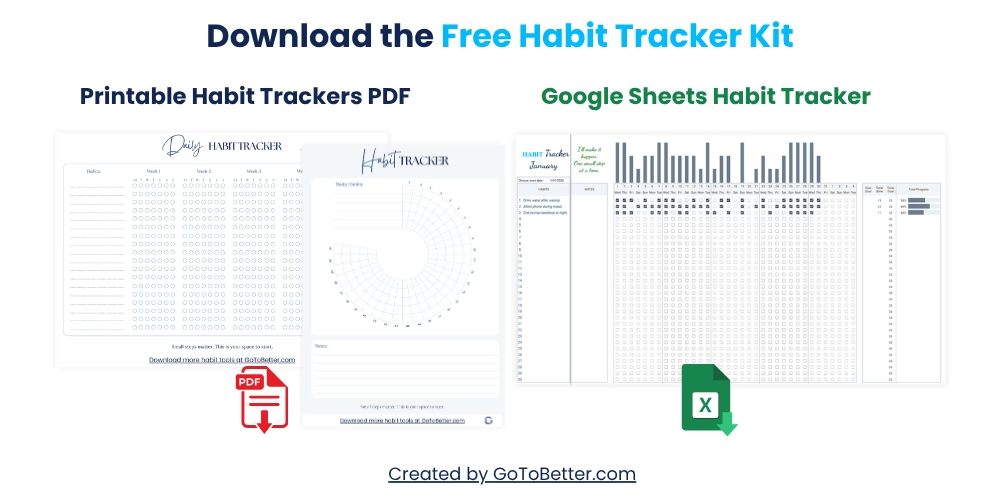
- A ready-to-use Google Sheets habit tracker — structured for shared use, with personal columns, optional color coding, and space for up to 30 habits
- Two printable tracker PDFs — a clean daily grid and a 30-day circle you can use side-by-side or separately
- Fully editable, mobile-friendly, and friction-free — just copy it and go
Write your email and get your Free Kit here↓
What Is a Shared Habit Tracker in Google Sheets?
A shared habit tracker in Google Sheets is a simple spreadsheet designed for two people to log their daily habits side by side — with zero syncing tools, logins, or judgment involved. It’s for couples, roommates, or anyone co-living who wants light accountability without pressure.
Each person gets their own column. That’s it. No shared goals required. No joint progress bars. Just one space where both of you can check in quietly — even if your habits are completely different.
For example, in one household: one partner tracks yoga, bedtime, and journaling. The other tracks screen-free evenings and laundry. Neither checks up on the other. But the act of filling it in — in view of someone else — changes the dynamic. There’s shared visibility, without shared control.
GoToBetter says it like this: “You don’t need shared goals to use a shared tracker — just shared space.”
Unlike apps with permissions or gamified reminders, Google Sheets keeps it quiet and visual. You both open the same file, on your phones or laptop, and just mark a square. No login battles. No clunky UX. Just clarity.
This simplicity is what makes it sustainable. You’re not trying to become the same person — you’re just making room for each other’s growth to be visible.
It works for couples, roommates, teens and parents, or even two friends living apart but checking in. As long as you respect each other’s space — and the tracker reflects that — the structure will hold.
Why Use a Habit Tracker as a Couple or Household?
Shared tracking isn’t about nagging. It’s about having a neutral place where habits live outside your head — and outside your relationship.
Let’s say one partner forgets their goals for a week. The other keeps going. The sheet absorbs that contrast without drama. It doesn’t accuse. It just reflects.
That small shift — from personal memory to shared space — creates light accountability. Not the kind that makes you feel watched. The kind that quietly reminds you that effort is visible, even when results aren’t.
GoToBetter InsightUse a single sheet with side-by-side columns. It creates quiet visibility — not pressure — and keeps each person’s space emotionally neutral.
Living together already brings friction: different rhythms, priorities, energy levels. A shared tracker helps soften that. It doesn’t solve anything big — but it gives shape to your intentions, and lets them coexist.
Think of it like this: your tracker is the kitchen table. You both leave your notes there. You don’t have to read them. But you know they’re seen.
That’s enough to change how you show up — especially on the days when motivation’s gone.
How to Set Up Your Shared Sheet (Without Conflict)
Before anything else: keep it dead simple. Two columns, one for each person. No formulas needed. No syncing rules. No pressure to fill every box.
Start with a blank Google Sheet. Put days or dates in rows, and your names in two top columns. That’s the base. From there, you can choose how detailed or visual you want it to be.
How to Set Up a Shared Habit Tracker in Google Sheets
Follow these steps to create a stress-free, visible tracker for two people — no tech skills required.
Step 1 – Create the Blank Grid
In a new Google Sheet, make a list of dates or days down the leftmost column. Then create two columns next to it — one for each person.
Step 2 – Label Your Columns
Write each person’s name at the top of their column. Keep it clean and visual. You can merge cells if you want space for a title above.
Step 3 – Decide on Your Habits
Each person picks their own habits. No overlap needed. You might track brushing teeth and stretching. Your partner might choose meditation and dish duty.
Step 4 – Add Optional Color Coding
If you want to make it more visual, use light colors to mark completions. Each person can pick their own color for easy scanning.
Step 5 – Set a Rhythm to Check In
Decide when you’ll glance at the tracker. Morning? Before bed? No rule — just agree on when it fits naturally.
One quiet tip? Leave a row between each week to make it breathable. Add a “notes” column if you want to jot something, but don’t overcomplicate it. This isn’t a journal. It’s a mirror.
GoToBetter says it like this: “A good shared habit sheet is like a quiet witness — not a scoreboard.”
Here’s a quick table to show a minimalist weekly setup:
| Date | Partner A | Partner B |
|---|---|---|
| Monday | ✅ Yoga ✅ No phone in bed |
✅ Walk ✅ Dishes |
| Tuesday | ⏳ Skipped | ✅ Walk |
| Wednesday | ✅ Journal | ✅ Clean counters |
Each cell is freeform. You can type an emoji, use a checkbox, or just color it in. The tracker doesn’t care. The point is that you see it — and that someone else does too.
What to Track Together — and What to Track Separately
Here’s the thing: just because you’re living together doesn’t mean your habits should match. Trying to “sync up” everything is a fast way to get resentful.
Instead, treat shared tracking like shared space. You can work on different things, but you’re still doing it side by side. One person might want to sleep earlier. The other’s trying to drink more water. Totally fine.
That said, some habits make sense to track jointly. Think shared chores, weekly goals, or routines like “no phones at dinner.” For these, you can add a third column labeled “shared.” Or just add a color bar that stretches across both names when you both do it.
GoToBetter InsightTry a split layout: one column per person, plus one optional row or tag for shared goals. This prevents overreach and respects autonomy.
When we first started using a shared tracker at home, we made the mistake of trying to do the same three habits. It flopped. Now, we each write our own — with a soft weekly prompt for one thing we’ll try together. That small shift saved a lot of silent tension.
You might notice some overlap (e.g. both trying morning walks). That’s great — but let it happen naturally. The goal isn’t sameness. It’s quiet mutual visibility.
Designing for Visibility (Not Pressure)
One of the most powerful — and underrated — features of a shared habit tracker is its ability to quietly remind you that you’re not alone in your effort. But that only works when the tracker is visible enough to feel present, yet gentle enough not to feel like surveillance.
That balance is delicate. Place it too far out of sight, and it becomes “out of mind.” Place it too centrally — like casting it to the living room TV — and it starts to feel like a scoreboard.
Here’s what worked for us: we printed the week’s habit grid and stuck it to the side of the fridge. Not front and center. Just… present. Enough to catch a glance while pouring coffee. Enough to remember, “Oh yeah, I said I’d move today.”
On busy weeks, we keep the digital sheet open on a tablet in the hallway. Low brightness. No beeps. Just quiet presence.
Some people prefer fully digital setups. That works too — as long as the file is easy to access and isn’t buried in a folder jungle. You can even bookmark it to your phone’s home screen. Tap it before bed. Tap it while brushing teeth. No pressure. Just return to it.
Visibility creates a feedback loop. But it only works if it feels like a reminder — not a rebuke. That’s why layout and placement matter just as much as what’s inside the tracker.
Also: resist the urge to comment on each other’s check-ins. That “oh, you skipped again?” glance? Kill it. Trust the visibility. Let it speak for itself.
Privacy in a Shared Tracker (Without Tech Complexity)
You don’t need separate tabs, hidden sheets, or permission settings to respect privacy in a shared habit tracker. You just need a layout that makes it emotionally safe to be seen — and sometimes, not seen.
For starters, keep each person’s column clearly separate. Don’t stack them vertically. That way, one glance doesn’t automatically compare. Horizontal layouts reduce the urge to scan across and “rate” each other.
Second, consider leaving some habit rows blank. Not every habit needs to be public. You can track one or two things privately — in a paper journal or personal file — and keep the shared sheet for light, low-stakes actions only.
For example: brushing teeth, stretching, drinking water, doing dishes. Basic, visible, easy-to-mark. If something feels too personal, don’t include it. The tracker is a tool, not a confession booth.
You can also use neutral symbols instead of habit names. If a habit’s sensitive — like tracking screen time after 9pm — just write “H1” or “” in the habit list and color the cell when done. You know what it means. Your partner doesn’t have to.
Remember, privacy isn’t about secrecy. It’s about boundaries. The more your tracker respects those, the more useful it becomes.
Printable Bonus: Use the Paper Tracker for Quick Wins
Sometimes, especially in hectic households or screen-tired evenings, digital tools just don’t cut it. That’s why the Free Kit includes two printable versions you can use side-by-side, without touching a device.
One is a clean daily grid — easy to tape inside a cupboard door or leave on the hallway table. The other is a circular 30-day tracker, which some couples color in each night as a calming ritual.
Paper adds a different kind of presence. You don’t need to open anything. It’s already there. A glance, a tick, done. For visual people or those trying to reduce screen time, this can make all the difference.
And it’s not either/or. Many households use both. Google Sheets for data and trends, paper for week-by-week reality. If your partner isn’t into digital tools, let them use the printable version. Keep the system loose enough to flex with both of you.
Here’s what one household does:
- Google Sheet on Monday–Friday
- Paper tracker by the bed on weekends
- Compare notes (briefly!) every Sunday night over tea
The point isn’t precision. It’s connection. Tracking together doesn’t mean tracking the same way — just being part of the same intention.
Try This: Shared Tracking Prompts to Reflect Together
Sometimes, the shared tracker becomes more than just a log. It turns into a reflection point — a place to notice patterns, encourage without judgment, or simply talk about how the week went.
That’s where light prompts come in. These aren’t deep therapy questions. Just gentle nudges to stay in sync. Here are a few you can ask each other at the end of the week:
- What habit felt easiest this week — and why?
- Was there a day we both struggled?
- What’s one habit you noticed the other person doing (even if it wasn’t tracked)?
- Is there something we want to try doing together next week?
No big talks. Just a few minutes of noticing. Over time, this builds something stronger than accountability — it builds shared awareness. That’s the kind of motivation that actually sticks.
Common Mistakes When Sharing a Habit Sheet
Even with the best setup, a shared habit tracker can quietly unravel. Not from technical problems — but from human ones. The pressure. The awkward comments. The silent comparisons. Here’s what to watch out for.
First mistake: trying to track the same things. Unless both people genuinely want that, don’t force it. You’re allowed to have different focuses, different paces, and different goals. In fact, it’s healthier if you do.
Second mistake: correcting or commenting on the other person’s habits. Even subtle remarks like “you haven’t filled it in today” can land as criticism. If someone forgets, trust that they know. Let the tracker reflect — not remind.
Third mistake: stacking too many habits too soon. Especially when you’re tracking together. Keep it light at the start — two or three habits max per person. You can always expand once the rhythm feels stable.
Fourth mistake: turning it into a routine audit. The sheet should never feel like an evaluation tool. If your weekly review becomes a performance meeting, you’ve missed the point. Stay observational. Not judgmental.
Think of your shared tracker like a park bench. You both sit there sometimes. No one has to explain why they came or what they’re thinking. It’s just shared space. That’s what makes it powerful.
And if one person stops using it for a while? Don’t make it a thing. Let the tracker breathe. You can keep going quietly. Often, they’ll come back — not because you said something, but because you didn’t.
Start Here: Free Habit Tracker Kit for Couples or Families
Want to try this without building it from scratch?
The Free Google Sheets Habit Tracker Kit is already set up for two users. You’ll get:
- A Google Sheets template with side-by-side habit columns, optional color coding, and up to 30 customizable habits
- Two printable PDF trackers — a clean weekly grid and a 30-day circle format you can hang or use offline
- Mobile-friendly layout with no setup required — just copy the file and go
It’s the same format we use at home. Quietly visible. Easy to fill. Built for real life — not perfect life.
Some couples fill it in at night together. Others check in alone and compare weekly. Some roommates just use it to track shared chores without talking about it. However you use it, the structure holds — even when your motivation doesn’t.
Download it free and make it your own.
GoToBetter Mini Tool: 2-Minute Tracker Talk
If you’re just starting your shared tracker, this quick tool helps you get aligned — without overexplaining or overplanning.
Each person answers the same three questions. One sentence each. No feedback, no fixing — just hearing each other out.
- What’s one thing I want to track — and why does it matter to me right now?
- How do I want this tracker to feel when I open it (light, useful, invisible)?
- What’s one thing I don’t want from this (pressure, reminders, comparison)?
You can speak your answers out loud or write them next to your name in the sheet. You’re not agreeing on habits — you’re just making space for each other’s reasons.
This isn’t about syncing your lives. It’s about respecting how each of you wants to show up — on your own terms.
Want to Keep Going? Here’s What Helps
This article is part of the GoToBetter Google Sheets Habit Tracker system — a practical, pressure-free way to stay consistent in real life.
To go deeper into the full method (including mindset, setup, and more tracker tools), read this:
Read The Ultimate Guide to Google Sheets Habit Tracker — your no-fluff, real-life guide to building clarity through daily tracking.
If you want to try this for yourself, the Free Google Sheets Habit Tracker Kit is ready to use. No setup. No fluff. Just helpful tools:
- Google Sheets habit tracker (for 2 people, editable, mobile-ready)
- Two printable PDFs — daily grid + visual 30-day circle
- Clean design, no logins, works with your actual life
Feel like giving this a try tomorrow? Drop your email and we’ll send the kit instantly:
Get the Free Google Sheets Habit Tracker Kit:
Shared Habit Tracker FAQ
How does a shared habit tracker in Google Sheets work?
A shared tracker uses one spreadsheet with separate columns for each person. You both log your habits in real-time — no syncing or apps needed. It works best when you keep it simple: clear layout, personal space, and no pressure to match routines.
Can each person track different habits in the same sheet?
Yes — and that’s the point. You don’t have to align your goals. Each person can track whatever matters to them. Sharing space doesn’t mean sharing goals — just visibility and rhythm.
How do we avoid turning it into judgment or pressure?
Set a no-comment rule upfront. Don’t point out missed days or ask about skipped habits. Let the tracker reflect quietly. It’s a mirror, not a scoreboard — presence over performance.
Is it okay to use printouts instead of the Google Sheet?
Absolutely. The printable versions are just as effective, especially if your household prefers offline habits. Many people use both — digital on weekdays, paper on weekends — and combine them during weekly check-ins.
Ready to Go Deeper?
When daily check-ins start to feel grounding — not exhausting — it might be time to build something more complete.
That’s where the Ultimate Habit Tracker comes in.
Designed for real-life rhythms (and real-life chaos), it lets you:
- Track multiple habits with clarity
- Reflect without overthinking
- See patterns across sleep, mood, energy, and effort
- Adjust your routines without starting over
You don’t need a perfect system. You just need one clear view — and space to grow inside it.
Check out the Ultimate Habit Tracker →
Or explore all habit trackers in the GoToBetter Shop — from minimalist daily sheets to full reflection systems built for real life, not perfection.