
+Free Google Sheets Tracker & Daily Printable PDFs
If you’re exploring how to use a hybrid habit tracker, this guide shows how to mix paper and digital tools without syncing them. Includes: a simple weekly reset system, real examples, and a free kit with a ready-to-use Google Sheet and printables.
By GoToBetter | Built for clarity, not complexity
Why Use a Hybrid Habit Tracker (And Why You Don’t Need to Sync It)
If you like the idea of paper tracking but also want a digital overview, a hybrid habit tracker is a smart move.
It gives you the freedom of scribbling something quick on paper without giving up the power of a bigger-picture view in Google Sheets. The key is: you don’t have to sync everything.
Seriously—trying to keep both formats perfectly aligned is usually what burns people out. Instead, let each version do what it does best.
At GoToBetter, we use paper in the moment — and Sheets for the long view. They don’t have to match. They just have to work for you.
And we’ve made it easy to try this yourself.
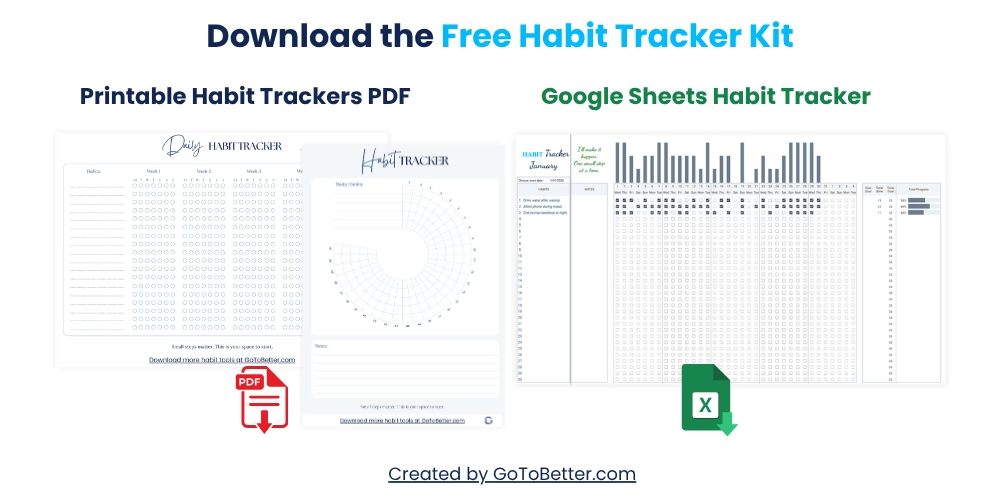
Start with the Free Google Sheets Habit Tracker Kit — designed to help you build your hybrid system without stress.
Here’s what you get:
- A fully editable Google Sheets tracker — mobile-friendly, click-to-track, with built-in progress bars
- Two printable PDFs — a daily grid and a 30-day visual circle
- Use them separately or together, no syncing required
Perfect for anyone starting small — or starting again.
Write your email and get your Free Kit here↓
What Is a Hybrid Habit Tracker (And Why Use One?)
A hybrid habit tracker combines two different tracking tools: a printable habit tracker PDF you can use with pen and paper, and a Google Sheets daily habit tracker you can use on your phone or laptop.
Each one serves a different role. The paper version gives you immediacy — it lives on your desk, your fridge, or your journal. The spreadsheet gives you the long view — progress over weeks, trends, and clarity you can’t always see day to day.
Using both means you can stay grounded in the moment while still keeping track of the bigger picture. But there’s a catch: most people think they need to sync them.
You don’t. In fact, trying to sync your paper and digital tools is usually where the chaos begins.
GoToBetter says it like this: “Don’t try to merge formats—let them serve different roles.”
Think of it like cooking: the paper tracker is your spice jar — always within reach. The spreadsheet is your pantry inventory — a place to look when you want to plan or reflect.
GoToBetter InsightUse paper for presence, digital for pattern. One captures the moment, the other reveals the path.
And just like cooking, you don’t need to follow a fixed recipe. Your hybrid method is yours to adjust. Some days, you’ll use both. Some days, just one. That’s not inconsistency. That’s adaptability.
Common Problems With Dual Tracking (And How to Avoid Them)
The most common issue with using both a printable habit tracker PDF and a Google Sheets habit tracker is this: people try to treat them like copies of each other.
They start the day writing on paper. Later, they feel guilty for not transferring it into Sheets. Or they update Sheets but forget the paper tracker on the fridge. Suddenly, it feels like you’re doing double the work — and still missing half the picture.
You don’t need to duplicate everything. The printable habit tracker and spreadsheet are not meant to mirror each other. They’re meant to complement.
This is where most digital and analog habit tools go wrong — they assume syncing equals success. But real-life habit tracking is more like improvising jazz than following a metronome.
GoToBetter says it like this: “Your tracker should support your life, not demand more from it.”
Here’s what often goes wrong — and what works better instead:
| Problem | Instead of This | Try This |
|---|---|---|
| Trying to match every habit in both formats | Copying the same list to paper and digital | Use 3–5 habits on paper, full list in Sheets |
| Forgetting to update one format | Feeling guilty and quitting | Let it go — reconnect next week |
| Tracking too much detail on both sides | Logging mood, sleep, water everywhere | Choose: paper for feeling, digital for data |
Trying to force two systems to behave like one is what drains your energy. Instead, let each one have its own rhythm.
You might do your printable each morning with coffee. Then ignore it. At night or once a week, you update the Sheet. You’re not behind — you’re just using the tools in ways that fit their strengths.
Why You Don’t Need to Sync Everything
There’s a persistent myth that hybrid tracking only works if it’s tightly organized and synchronized. But that’s usually the fastest route to burnout.
The whole point of using a printable and digital habit tracker together is to make things easier, not harder. If you feel pressure to keep both perfectly up to date, the system becomes the problem.
Let’s be clear: hybrid tracking is not about redundancy. It’s about role-splitting.
The daily tracker PDF might be where you jot what actually happened — or how you felt about it. The Google Sheet? That’s where you take one step back and look for patterns: where you tend to skip, what’s working, and what’s not.
This works especially well when your days are unpredictable. You don’t have to “keep up” — just drop back in whenever you’re ready. Nothing breaks. Nothing resets. It’s a tracking system that’s flexible because it doesn’t rely on perfection.
GoToBetter InsightTry skipping the idea of syncing altogether. Let your digital tracker reflect the big picture — and let your paper version be fully in the now.
One example: I keep a printed tracker tucked into my notebook and only fill it out in the morning. It covers just three habits. But in my Sheet, I see the full week’s habits and mood trends. The overlap is maybe 20% — and that’s the sweet spot. Just enough to feel grounded. Not enough to feel trapped.
A Simple Hybrid Routine That Actually Works
You don’t need a complex workflow or an app that “integrates both.” In fact, the more tools you use, the harder it is to stay consistent. What works is this: define what each tool is for — and let that guide your rhythm.
Here’s a simple hybrid method that uses both printable and digital formats without overwhelm:
- Use a daily tracker PDF for the morning: checkboxes, mood, short notes. Keep it on paper. No need to open anything.
- Use a Google Sheets habit tracker once a week: Sunday evening or Monday morning. Log what you remember. Notice what stuck. Update your patterns. Done.
This is the rhythm I’ve used for the last year. Some weeks I forget the PDF. Some weeks I skip the Sheet. But because I’ve never tried to force them to match, I’ve never burned out.
The flexibility is the reason it works.
You might notice that your digital tracker gives you motivation when you see the bars fill in — while your paper sheet gives you relief, because you don’t have to scroll, swipe, or charge anything. That balance is the goal.
Daily Use: How to Use Paper for Micro Tracking
Paper works best when it’s instant. You see it. You write. You’re done.
That’s why your printable habit tracker PDF should be visible — not filed away. Keep it in your notebook, on your desk, or beside your coffee mug. Make it a friction-free moment.
And it doesn’t have to track everything. In fact, it shouldn’t. Choose just 2–5 habits — the ones you most want to notice in your day.
These might include:
- Water intake
- Stretching or posture breaks
- Opening your journal
- A quick moment of stillness
You don’t need full sentences. You don’t need timestamps. This is about presence, not proof.
Some mornings, you’ll do all your habits before even marking the sheet. Other days, the act of marking will nudge you into doing them. Either way — it counts.
One day, I scribbled a circle around “journal” on my PDF even though I hadn’t written anything. That night, I opened the journal just because I saw the mark. That’s the magic of paper: it reminds you gently, without pressure.
There’s no password. No app crashes. Just pen and page — your simplest self-tracking ally.
Weekly Reset: Using Google Sheets for the Big Picture
While the paper version helps you stay present, your Google Sheets daily habit tracker is where you zoom out.
At GoToBetter, we use the spreadsheet once a week — usually on Sundays. It’s a chance to stop, breathe, and ask: what actually happened?
Instead of updating it every day (and feeling guilty when you don’t), treat your Sheet like a reset, not a report card.
Here’s the routine:
- Open your tracker on your laptop or phone.
- Look back over the past 7 days.
- Mark what you remember — don’t overthink it.
- Notice your streaks, gaps, and any emerging patterns.
- Reset your intention for the next 7 days. One click.
That’s it. No guilt. No over-analysis. Just reflection and a clean slate.
If you’re using the Ultimate Habit Tracker or Minimalist Tracker, you’ll see dynamic progress bars update automatically — that’s the visual cue you’ve probably been missing. The whole system is built to reward participation, not perfection.
This is where hybrid tracking becomes powerful: you stop reacting to each day and start responding to the week.
How to Adjust When One Format Breaks Down
It will happen.
You’ll forget your printable PDF for a week. Or you’ll get sick and won’t open your Sheet for two. Life moves. Tools get dusty. That’s not failure — it’s expected.
The reason this method works long-term is because neither format depends on the other. They’re not synced. They’re parallel. So if one drops out, the other keeps going.
That’s a strength — not a flaw.
If you realize the paper isn’t helping anymore, pause it. Go digital-only for a while. Or if your energy shifts, go fully analog for a month. You’re not falling off — you’re adapting the system to your real life.
Remember: the printable and digital habit tracker are tools, not rules.
There were entire weeks where I only used the visual circle PDF. I never even opened the Sheet. But when I came back? All the structure was still there. Waiting. Not judging.
You might ask yourself:
- Which one helps me notice more clearly right now?
- Which one feels like friction?
- What’s the easiest way back in?
The answer is almost always: start where you are, use what works today, and drop the rest.
Real-Life Examples (And Why They Work)
No two hybrid setups look the same — and that’s the point. Here are a few real examples of what works (and why):
- Morning-only PDF: One user prints the minimalist daily grid and keeps it inside their journal. They use it to track just three habits: hydration, stillness, and morning movement. The rest happens in Sheets on Sunday night.
- Emotional tracker on paper, functional in Sheets: A reader tracks mood and motivation on a 30-day circle printable — one dot per day. But their spreadsheet tracks meals, workouts, and productivity streaks. One is for presence, one for patterns.
- Travel version: When on vacation, they only take the printed tracker — no device stress. Then they log catch-up notes in Sheets later if they want. Sometimes they don’t. It still works.
None of these systems are about syncing. They’re about flexibility, clarity, and ease.
You might notice the same trend: less data, more insight. Less pressure, more rhythm. That’s how hybrid tracking becomes sustainable — not perfect, but alive.
GoToBetter Mini Tool: Hybrid Cue Setup
Test how easily you can stay consistent without syncing. Use this mini rhythm to let paper and digital support each other — instead of fighting for your attention:
- Pick a visible place for your paper tracker (journal, fridge, notebook).
- Set a weekly phone reminder: “Check Google Sheet?”
- Use the paper tracker during your day. Use the digital one on reset days. That’s it.
This isn’t syncing. It’s rhythm. Let each tool do its job — no overthinking.
Try the Free Hybrid Habit Tracker Setup
Want to try a hybrid setup without syncing or stress? Download the Free Habit Tracking Starter Kit. It includes:
- Printable Daily Habit Tracker (PDF)
- Google Sheets Tracker with Visual Progress
- Setup Guide with weekly rhythm built in
No over-planning. No syncing stress. Just two formats that work together — even when life doesn’t.
Get the Free Habit Tracking Starter Kit:
Hybrid Habit Tracker FAQ
What is a hybrid habit tracker?
A hybrid habit tracker combines two formats: a printable tracker you can use daily on paper, and a Google Sheets version you check weekly. Each format serves a different purpose — one for presence, one for perspective.
Do I need to sync the paper and digital tracker?
No. There’s no syncing required. These tools aren’t meant to mirror each other. The paper version supports your daily flow, while the digital tracker gives you weekly reflection and long-term data — without overlap.
How often should I use each format?
Use your paper tracker daily if it helps you stay grounded. Use the Google Sheets tracker once a week to review patterns and reset. You don’t need to update both every day — in fact, we recommend you don’t.
What if I skip one format for a while?
That’s expected. The strength of hybrid tracking is flexibility. You can pause one format (paper or digital) and still stay on track. When life changes, your system adapts with you.
Where can I get a hybrid habit tracker setup?
You can download both the printable and Google Sheets versions in the Free Habit Tracking Starter Kit below. No syncing, no setup — just print, open, and start where you are.
What If You Want the Full Habit Strategy?
Want the full strategy? Read The Ultimate Guide to Google Sheets Habit Tracker.
You don’t have to build a perfect system. You just need something that works — on a Tuesday morning when you’re already late, or on a Sunday when you finally have five minutes to think.
This hybrid tracker gives you both: presence in your day, and clarity over time. It doesn’t ask for more than you have. It fits around your actual life.
You can start with just one format. Add the other later. Or swap between them when your rhythm shifts. That’s not failure — that’s exactly how this is meant to work.
Try it. See how it feels. You’ll know if it helps.